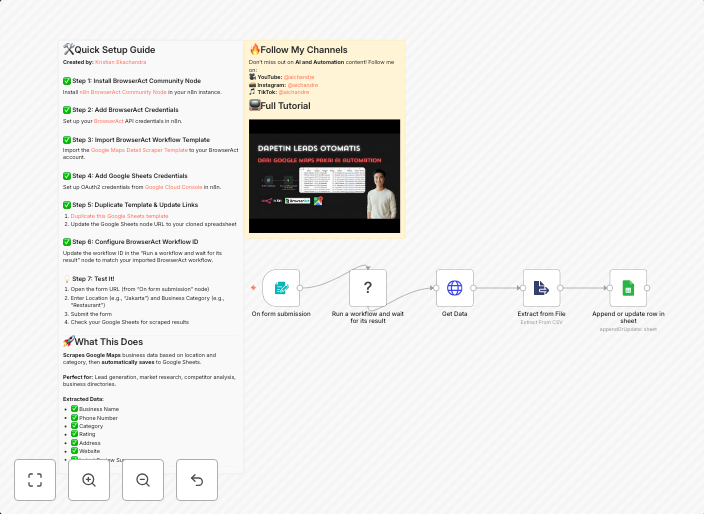
Scrape Google Maps business data with BrowserAct and Google Sheets
Automatically scrape Google Maps business data using BrowserAct AI automation and save results directly to Google Sheets. 🎯 What This Workflow...
Get This WorkflowAbout This Workflow
What This Workflow Does
This workflow leverages BrowserAct AI automation to scrape Google Maps business data, which is then automatically saved directly to Google Sheets. The result is a streamlined process for collecting and organizing business data from Google Maps. This workflow simplifies market research and data collection tasks.
Who Should Use This
This workflow is ideal for marketers, business owners, and researchers who need to collect and manage Google Maps data for market research, competitor analysis, or business intelligence purposes.
Key Features
- Automates Google Maps business data scraping using BrowserAct AI
- Saves scraped data directly to Google Sheets for easy organization and analysis
- Streamlines market research and data collection tasks
- Enables automatic update of Google Sheets with new data
How to Get Started
To use this workflow, import it into your n8n account and customize it by connecting your Google Maps and Google Sheets accounts. Follow the workflow's instructions to automate the scraping and data saving process.
Use This Workflow in n8n →Similar Workflows




Affiliate Disclosure: We may earn a commission if you sign up for n8n through our links. This doesn't affect our recommendations.