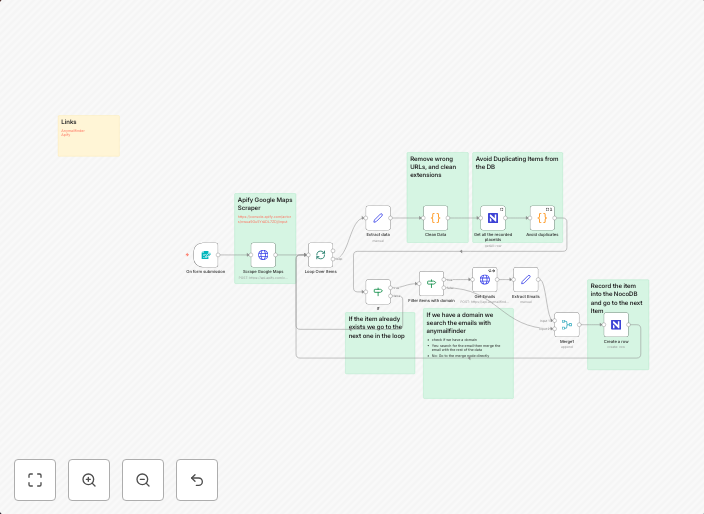
Scrape Google Maps leads and find emails with Apify and Anymailfinder
Scrape Google Maps leads and find emails with Apify and Anymailfinder Short Description This workflow automates lead generation by scraping business data...
Get This WorkflowAbout This Workflow
What This Workflow Does
This workflow automates lead generation by scraping business data from Google Maps and finding associated email addresses using Apify and Anymailfinder. It enables users to efficiently collect and organize contact information for businesses, making it easier to target potential customers. The workflow combines web scraping with email lookup, streamlining the lead generation process.
Who Should Use This
This workflow is ideal for marketers, business owners, and developers who want to automate lead generation efforts and expand their sales or customer outreach. It's particularly useful for those who frequently need to gather contact information for businesses and organizations.
Key Features
- Google Maps Scraping: Extracts business data from Google Maps, including names, addresses, and phone numbers.
- Apify Integration: Utilizes Apify's web scraping capabilities to collect additional business data and enhance lead quality.
- Anymailfinder Integration: Finds associated email addresses for scraped businesses, providing a comprehensive contact list.
How to Get Started
To use this workflow, simply import it into your n8n instance and customize the settings as needed, such as specifying the desired geographic region or business types to target.
Use This Workflow in n8n →Similar Workflows




Affiliate Disclosure: We may earn a commission if you sign up for n8n through our links. This doesn't affect our recommendations.