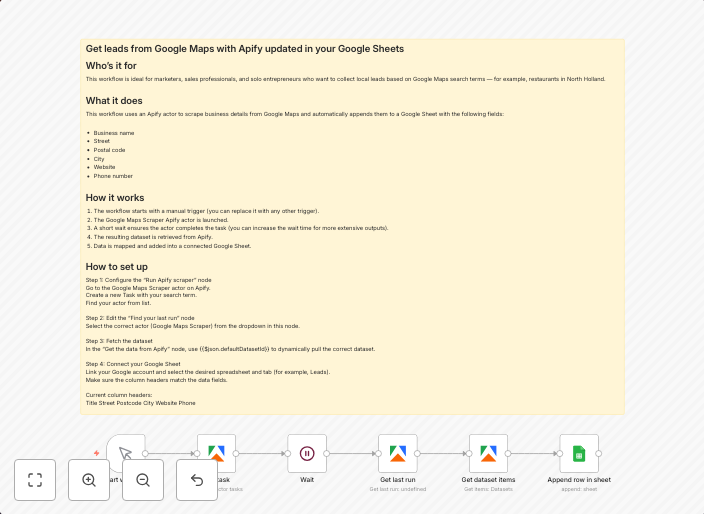
Scrape Google Maps leads to Google Sheets via Apify
This workflow contains community nodes that are only compatible with the self-hosted version of n8n. ## Scrape Google Maps leads to Google Sheets via Apify...
Get This WorkflowAbout This Workflow
What This Workflow Does
This n8n automation workflow scrapes Google Maps for leads and exports them to a Google Sheets document using Apify. The workflow allows users to automate the collection and organization of business lead data from Google Maps. By utilizing Apify's web scraping capabilities, n8n users can easily extract relevant information and send it to Google Sheets for further analysis.
Who Should Use This
This workflow is ideal for marketers, business owners, and developers looking to automate lead generation from Google Maps. It's particularly useful for those who want to streamline their data collection process and save time.
Key Features
- Scrapes Google Maps for business leads and extracts relevant information
- Uses Apify for web scraping capabilities
- Exports data to Google Sheets for further analysis and organization
- Can be customized to fit specific business needs and data requirements
How to Get Started
To use this workflow, simply import it into your n8n instance and customize the nodes to fit your specific Google Maps and Google Sheets credentials. From there, you can set up the workflow to run automatically and start collecting lead data in real-time.
Use This Workflow in n8n →Similar Workflows




Affiliate Disclosure: We may earn a commission if you sign up for n8n through our links. This doesn't affect our recommendations.