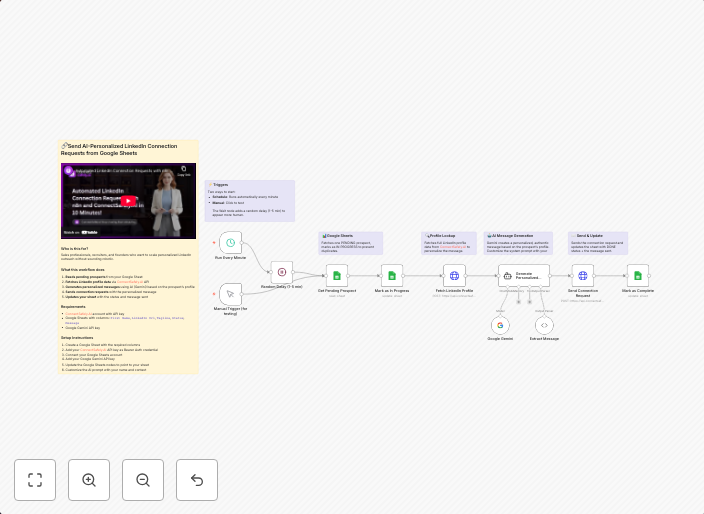
Send AI-personalized LinkedIn connection requests from Google Sheets with Gemini
Send AI-personalized LinkedIn connection requests from Google Sheets using ConnectSafely.AI API Who's it for This workflow is built for sales professionals,...
Get This WorkflowAbout This Workflow
What This Workflow Does
This workflow automates the sending of personalized LinkedIn connection requests using AI-generated content from Google Sheets. By leveraging the ConnectSafely.AI API, it enables sales professionals to personalize their outreach and connect with potential clients or partners on LinkedIn. The workflow streamlines the process of crafting and sending tailored connection requests, saving time and effort.
Who Should Use This
This workflow is built for sales professionals, business owners, and anyone looking to automate their LinkedIn outreach efforts. It's particularly valuable for those who want to personalize their connections and build meaningful relationships with potential clients or partners.
Key Features
- Sends AI-personalized LinkedIn connection requests from Google Sheets
- Utilizes the ConnectSafely.AI API for high-quality, tailored content
- Streamlines the process of crafting and sending customized connection requests
- Saves time and effort by automating the outreach process
- Integrates with Google Sheets for data-driven personalization
How to Get Started
To use this workflow, import it into your n8n account and customize the settings to match your specific needs. You'll need to connect your Google Sheets account and configure the ConnectSafely.AI API credentials to get started.
Use This Workflow in n8n →Similar Workflows




Affiliate Disclosure: We may earn a commission if you sign up for n8n through our links. This doesn't affect our recommendations.