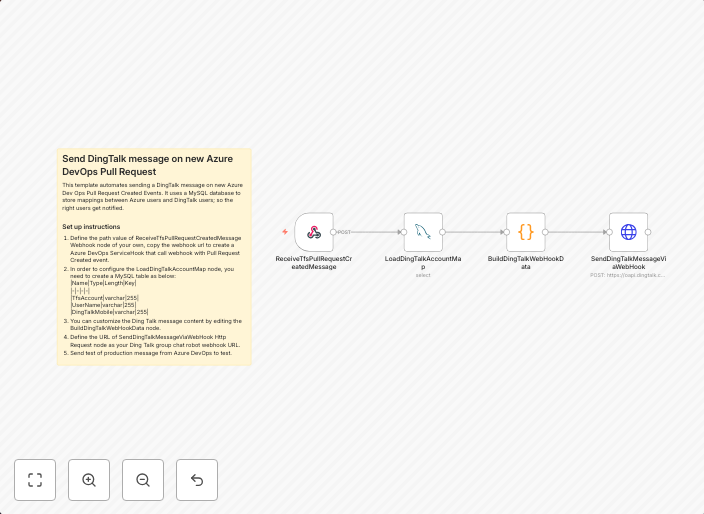
Send DingTalk message on new Azure DevOps pull request
This template automates sending a DingTalk message on new Azure Dev Ops Pull Request Created Events. It uses a MySQL database to store mappings between...
Get This WorkflowAbout This Workflow
What This Workflow Does
This n8n automation workflow sends a DingTalk message whenever a new Azure DevOps pull request is created. It achieves this by monitoring Azure DevOps for pull request events and then triggers a notification on DingTalk. The workflow uses a MySQL database to store mappings between Azure DevOps and DingTalk user IDs.
Who Should Use This
This workflow is ideal for developers, DevOps teams, and project managers working with Azure DevOps and DingTalk. It simplifies the process of keeping team members informed about new pull requests.
Key Features
- Triggers on new Azure DevOps pull request created events
- Uses a MySQL database to store user mappings between Azure DevOps and DingTalk
- Automates the sending of DingTalk messages for new pull requests
- Can be customized to fit specific team notification needs
How to Get Started
To get started, simply import this workflow into your n8n account and configure the Azure DevOps and MySQL database nodes according to your setup. Make sure to customize the user mappings to match your team's specific requirements.
Use This Workflow in n8n →Similar Workflows

Affiliate Disclosure: We may earn a commission if you sign up for n8n through our links. This doesn't affect our recommendations.