Send emails via Gmail from Obsidian
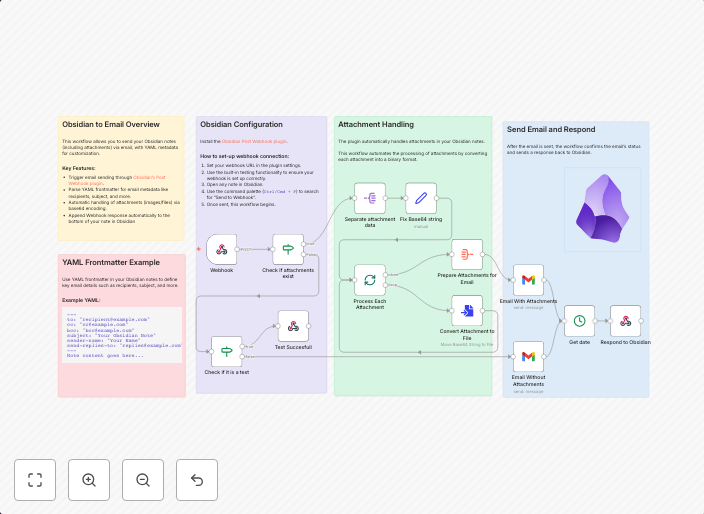
How it WorksThis n8n template makes it possible to send emails directly from your Obsidian notes. It leverages the power of the Obsidian Post Webhook...
Get This WorkflowAbout This Workflow
What This Workflow Does
This n8n template enables users to send emails directly from their Obsidian notes, streamlining their productivity and workflow. By leveraging the Obsidian Post Webhook, users can automate email tasks and stay organized. This workflow eliminates the need for manual email composition and sending.
Who Should Use This
This workflow is ideal for individuals who heavily use Obsidian for note-taking and require a seamless way to share information or notifications with others. It is particularly useful for knowledge workers, developers, and business owners who want to automate their email tasks.
Key Features
- Send emails directly from Obsidian notes using the Obsidian Post Webhook integration.
- Automate email composition and sending tasks, saving time and increasing productivity.
- Leverage the power of n8n to customize and extend the workflow to fit individual needs.
- Integrates with Gmail to send emails, ensuring compatibility with most email clients.
How to Get Started
To use this workflow, simply import it into your n8n account and customize the settings to match your Gmail account details. Then, configure the Obsidian Post Webhook to trigger the automation whenever you create a new note that should be sent as an email.
Use This Workflow in n8n →Similar Workflows




Affiliate Disclosure: We may earn a commission if you sign up for n8n through our links. This doesn't affect our recommendations.