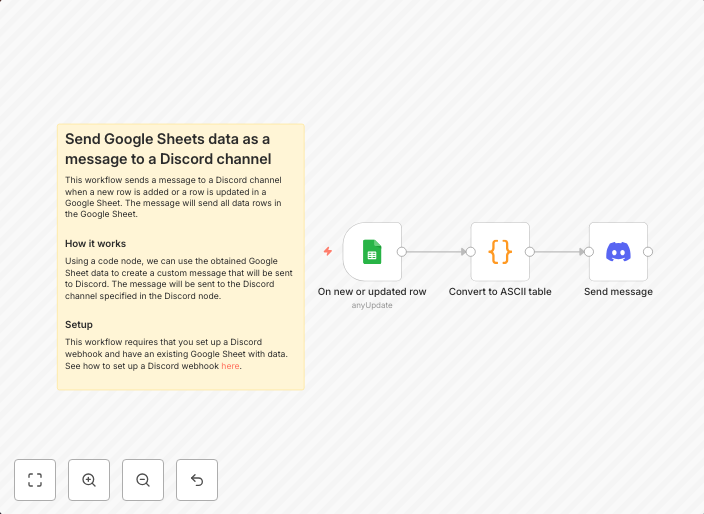
Send Google Sheets data as a message to a Discord channel
This workflow sends a message to a Discord channel when a new row is added or a row is updated in a Google Sheet. The message will send all data rows in the...
Get This WorkflowAbout This Workflow
What This Workflow Does
This workflow automates the process of sending data from a Google Sheet as a message to a Discord channel. When a new row is added or an existing row is updated in the Google Sheet, the workflow triggers, sending all data rows in the sheet as a message to the Discord channel. This helps keep team members informed about changes in real-time.
Who Should Use This
This workflow is ideal for team leaders, project managers, or business owners looking to improve communication and collaboration within their teams. It's perfect for anyone who needs to keep track of changes in a Google Sheet and wants to share that information with their team members through a Discord channel.
Key Features
- Real-time notifications: Receive notifications in Discord when a new row is added or an existing row is updated in the Google Sheet.
- Automated data sharing: Share all data rows in the Google Sheet with team members through a single Discord message.
- Customizable: Easily customize the workflow to fit your team's specific needs and communication style.
How to Get Started
To get started with this workflow, simply import it into n8n and connect your Google Sheet and Discord accounts. Customize the workflow by setting up the Google Sheet and Discord channel you want to use, and adjust the settings to fit your needs.
Use This Workflow in n8n →Similar Workflows




Affiliate Disclosure: We may earn a commission if you sign up for n8n through our links. This doesn't affect our recommendations.