Send personalized healthcare joke emails with OpenAI, Gmail, and Google Sheets
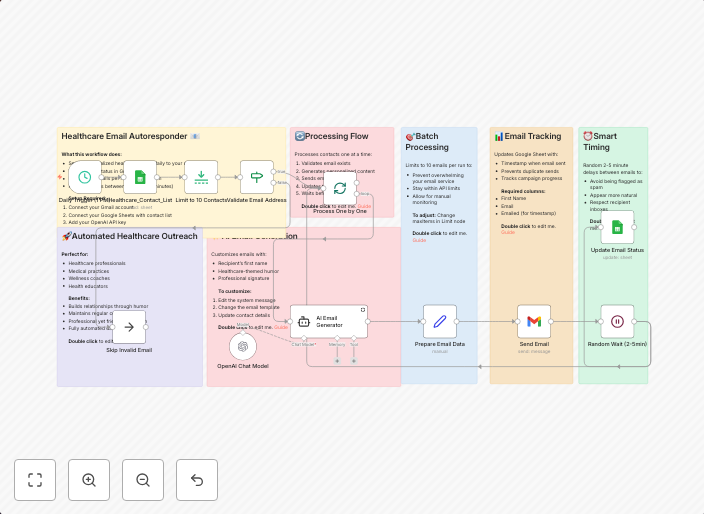
Healthcare Email Autoresponder - Daily Outreach 📧 A production-ready n8n workflow for automated healthcare email marketing with AI-powered personalization....
Get This WorkflowAbout This Workflow
What This Workflow Does
This workflow automates the process of sending personalized healthcare jokes via email using OpenAI for AI-powered content generation, Gmail for email sending, and Google Sheets for data storage and retrieval. It enables daily outreach to a list of contacts with tailored jokes, making it a valuable tool for healthcare email marketing. The workflow can be easily customized to accommodate various email marketing strategies.
Who Should Use This
This workflow is ideal for healthcare marketers, business owners, and developers looking to automate personalized email campaigns with AI-generated content. It's a production-ready solution that can be easily integrated into existing marketing strategies.
Key Features
- AI-powered joke generation: Uses OpenAI to create personalized healthcare jokes based on user input and preferences.
- Automated email sending: Sends customized emails using Gmail, allowing for daily outreach to a list of contacts.
- Google Sheets integration: Stores and retrieves data from Google Sheets, enabling easy management of contact lists and email campaigns.
- Customizable email templates: Allows users to customize email templates with their branding and marketing messages.
How to Get Started
To start using this workflow, simply import it into your n8n account and customize the workflow settings to match your specific email marketing requirements. This includes updating the OpenAI API key, Google Sheets credentials, and Gmail email account settings.
Use This Workflow in n8n →Similar Workflows




Affiliate Disclosure: We may earn a commission if you sign up for n8n through our links. This doesn't affect our recommendations.