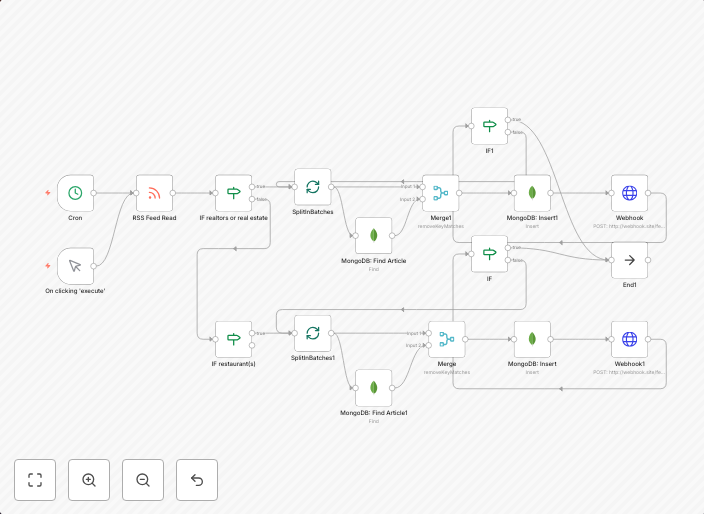
Send RSS feed data to webhook
Filters articles based on keywords, checks against MongoDB for unique links, then sends results to different webhooks
Get This WorkflowAbout This Workflow
What This Workflow Does
This n8n automation workflow filters articles from an RSS feed based on specific keywords and checks for unique links in a MongoDB database. It then sends the filtered results to different webhooks, allowing for customized notification and data sharing. This process enables real-time monitoring and distribution of relevant content.
Who Should Use This
This workflow is suitable for developers, marketers, and business owners who need to efficiently collect, filter, and disseminate data from RSS feeds to various webhooks. They can utilize this automation to streamline content collection and notification processes.
Key Features
- Keyword-based filtering: Articles are filtered based on specific keywords, allowing for targeted data collection.
- Unique link checking: MongoDB is used to prevent duplicate links from being sent to webhooks.
- Webhook notification: Filtered results are sent to various webhooks for customized notification and data sharing.
- Real-time data distribution: Data is collected and distributed in real-time, enabling timely decision-making and action.
How to Get Started
To use this workflow, import it into your n8n instance and customize the keyword filter and webhook settings to match your specific requirements. You can then connect your RSS feed and MongoDB database to complete the workflow setup.
Use This Workflow in n8n →Similar Workflows




Affiliate Disclosure: We may earn a commission if you sign up for n8n through our links. This doesn't affect our recommendations.