SERP competitor research with Scrape.do API & Google Sheets
🔍 Extract Competitor SERP Rankings from Google Search to Sheets with Scrape.do This template requires a self-hosted n8n instance to run. A complete n8n...
Get This WorkflowAbout This Workflow
What This Workflow Does
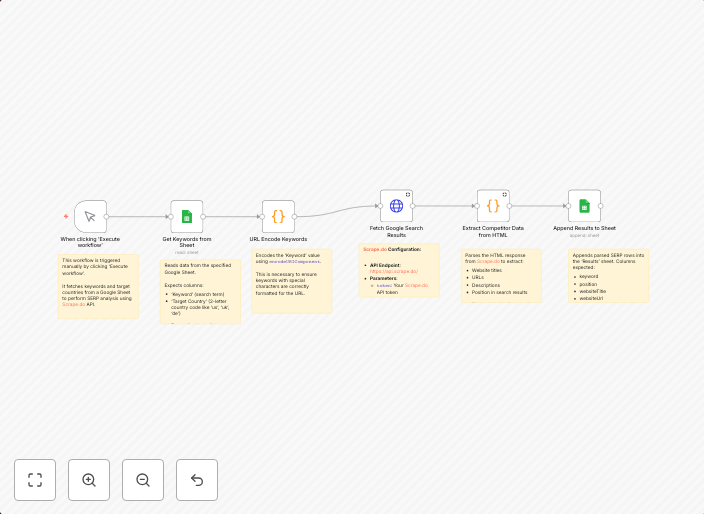
This n8n automation workflow extracts competitor SERP (Search Engine Results Page) rankings from Google Search and imports them into a Google Sheets document using the Scrape.do API. It automates the process of collecting and storing competitor ranking data, enabling users to track and analyze their online presence. The workflow provides a structured and efficient way to conduct market research.
Who Should Use This
This workflow is ideal for marketers, SEO specialists, and business owners who need to conduct competitor research and track their online presence. It requires a self-hosted n8n instance and familiarity with Google Sheets and the Scrape.do API.
Key Features
- Extracts competitor SERP rankings from Google Search using the Scrape.do API
- Imports data into a Google Sheets document for easy analysis and tracking
- Automates the process of collecting and storing competitor ranking data
- Provides a structured and efficient way to conduct market research
How to Get Started
To use this workflow, import it into your self-hosted n8n instance and customize it by setting up your Google Sheets document and Scrape.do API credentials. Configure the workflow settings to match your specific needs, and start collecting competitor ranking data to gain valuable insights into your online presence.
Use This Workflow in n8n →Similar Workflows




Affiliate Disclosure: We may earn a commission if you sign up for n8n through our links. This doesn't affect our recommendations.