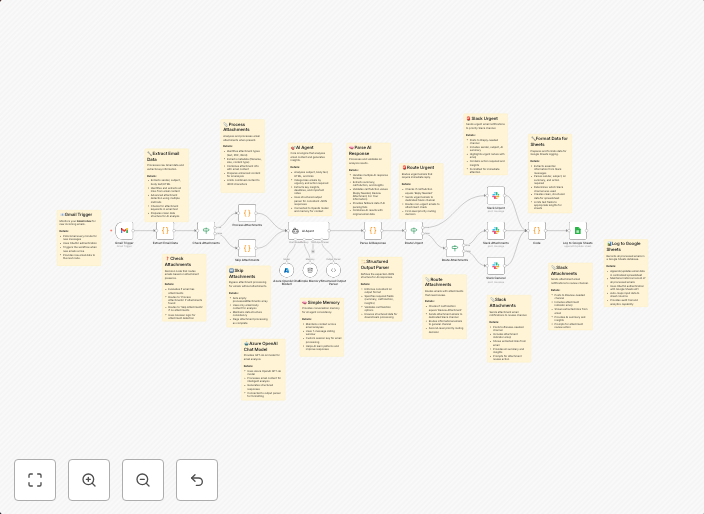
Smart email triage with Gmail, GPT-4, Slack and Google Sheets
DescriptionThis workflow intelligently analyzes incoming Gmail emails, classifies intent using GPT-4, and sends real-time Slack notifications while logging...
Get This WorkflowAbout This Workflow
What This Workflow Does
This n8n automation workflow intelligently analyzes incoming Gmail emails, classifies their intent using GPT-4, and sends real-time Slack notifications while logging the interactions in a Google Sheets database. This allows for efficient email triage, enabling users to quickly identify and address important emails. The workflow also provides a clear audit trail of email interactions.
Who Should Use This
This workflow is suitable for businesses and teams that rely heavily on email communication and want to streamline their email management processes. It is particularly beneficial for teams that use Slack for collaboration and need to quickly identify and prioritize incoming emails.
Key Features
- Email Classification: Using GPT-4, the workflow classifies email intent, enabling teams to quickly identify important emails and prioritize responses.
- Real-time Slack Notifications: The workflow sends instant notifications to Slack when new emails are received, ensuring team members stay up-to-date on incoming emails.
- Google Sheets Logging: Email interactions are logged in a Google Sheets database, providing a clear audit trail and making it easy to track email history.
How to Get Started
To use this workflow, simply import it into your n8n instance and customize the Gmail, GPT-4, and Google Sheets integrations to match your specific setup. You can then adjust the workflow settings to fit your team's unique email management needs.
Use This Workflow in n8n →Similar Workflows




Affiliate Disclosure: We may earn a commission if you sign up for n8n through our links. This doesn't affect our recommendations.