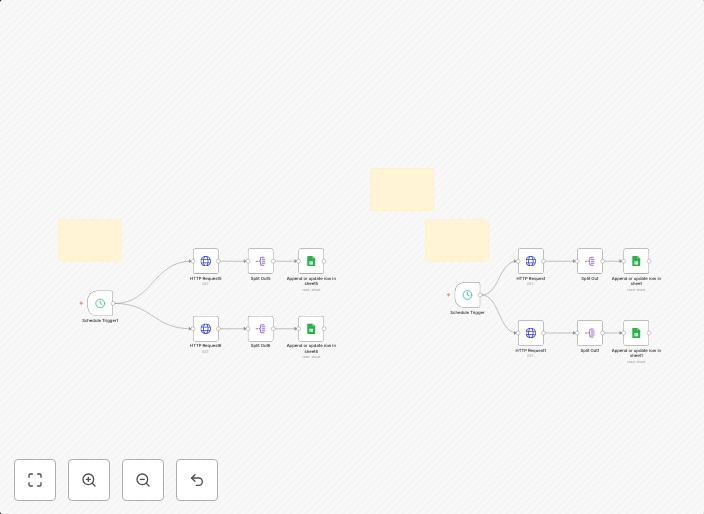
Smartlead email campaign analytics dashboard with Google Sheets integration
Workflow 1: Domain and Email Health 🩺This part of the workflow is triggered every 5 hours by the Schedule Trigger1 node. Its purpose is to pull health...
Get This WorkflowAbout This Workflow
What This Workflow Does
This workflow, created by Igor Fediczko, provides a comprehensive smartlead email campaign analytics dashboard with integration to Google Sheets. It is triggered every 5 hours, allowing for real-time updates and analysis of email campaign performance. The workflow pulls health data from various sources, enabling users to monitor and optimize their email campaigns effectively.
Who Should Use This
This workflow is ideal for marketers, business owners, and developers who manage email campaigns and want to streamline their analytics process. It is particularly useful for those who use smartlead and Google Sheets as part of their marketing stack.
Key Features
- Domain and Email Health Monitoring: The workflow continuously checks the health of domains and emails, ensuring that campaigns are not affected by technical issues.
- 5-Hourly Updates: The schedule trigger ensures that data is refreshed every 5 hours, providing users with up-to-date insights into their email campaign performance.
- Google Sheets Integration: The workflow integrates with Google Sheets, allowing users to easily view and analyze their campaign data in a familiar format.
- Automated Data Collection: The workflow automates the collection of data from various sources, reducing the need for manual data entry and minimizing the risk of human error.
Similar Workflows




Affiliate Disclosure: We may earn a commission if you sign up for n8n through our links. This doesn't affect our recommendations.