Snooze Todoist tasks until 3 days before due date
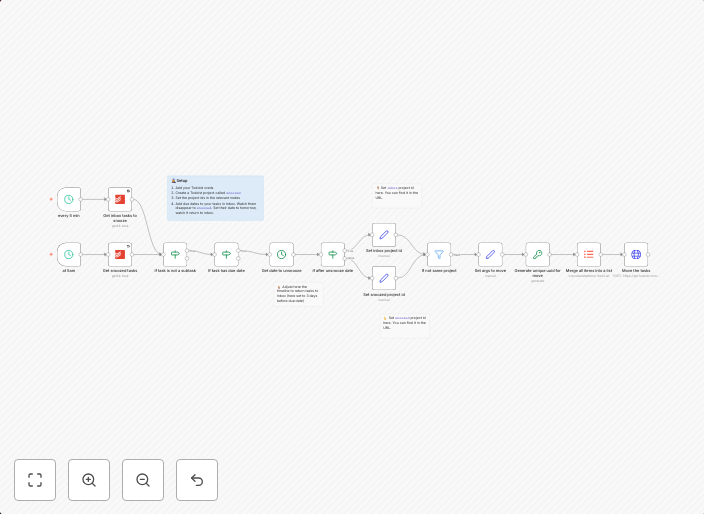
Use caseThis workflow snoozes any Todoist tasks, by moving them into a Snoozed todoist list and unsnoozes them 3 days before due date. Helps keep inbox...
Get This WorkflowAbout This Workflow
What This Workflow Does
This workflow automates the process of snoozing Todoist tasks, moving them to a designated "Snoozed" list, and unsnoozing them three days before their due date. This helps maintain a clutter-free inbox and ensures that tasks are manageable and focus-worthy. By automating this process, users can streamline their task management and increase productivity.
Who Should Use This
This workflow is ideal for individuals who rely heavily on Todoist for task management, such as personal productivity enthusiasts, freelancers, and small business owners who need to stay organized.
Key Features
- Task Snoozing: Automatically moves tasks to a designated "Snoozed" list, keeping them out of the main inbox.
- Scheduled Un-snoozing: Tasks are unsnoozed three days before their due date, ensuring they remain a priority in the main inbox.
- Todoist Integration: Seamlessly integrates with Todoist, utilizing its API to fetch and manipulate tasks.
- Customizable: The workflow's parameters can be adjusted to suit individual preferences, such as the snooze duration.
How to Get Started
To start using this workflow, import it into your n8n instance and customize the Todoist API credentials to match your account details. Then, configure the workflow to suit your specific needs, such as the snooze duration and the "Snoozed" list name.
Use This Workflow in n8n →Similar Workflows


Affiliate Disclosure: We may earn a commission if you sign up for n8n through our links. This doesn't affect our recommendations.