Speed Up Social Media Banners With BannerBear.com
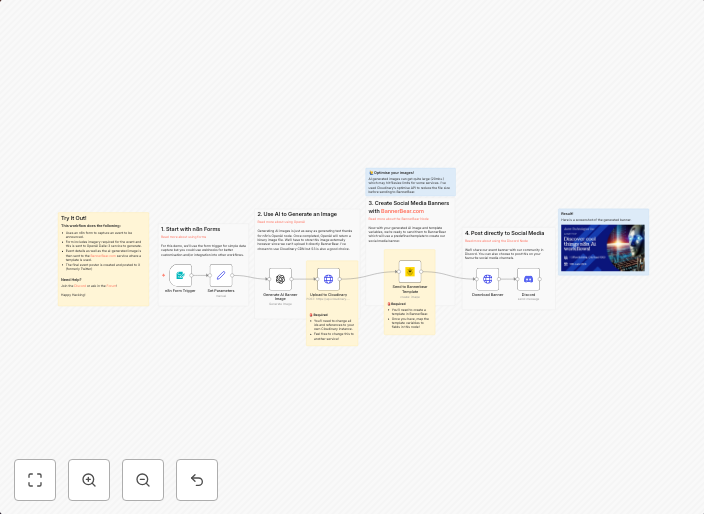
This n8n workflow shows an easy way to automate the creation of social media assets using AI and a service like BannerBear. Designed for the busy marketer,...
Get This WorkflowAbout This Workflow
What This Workflow Does
This n8n automation workflow automates the creation of social media banners using AI and the BannerBear.com service, saving time and effort for busy marketers. It streamlines the content creation process by integrating AI with a cloud-based service, allowing users to generate high-quality banners quickly and efficiently. The workflow enables marketers to focus on strategy and other tasks, rather than spending time designing individual social media posts.
Who Should Use This
This workflow is ideal for marketers, business owners, and social media managers who want to save time and improve their social media content creation process. It's perfect for anyone looking to automate repetitive social media banner design tasks and create high-quality visual content.
Key Features
- AI-powered banner design: The workflow uses Multimodal AI to generate high-quality social media banners.
- Integration with BannerBear: The workflow integrates with the BannerBear.com service to create and manage social media banners.
- Automated content creation: The workflow automates the creation of social media banners, saving time and effort for marketers.
- Scalable and customizable: The workflow can be scaled up or down to meet the needs of different marketing teams and campaigns.
How to Get Started
To get started with this workflow, simply import it into your n8n account and customize the settings to fit your specific needs. You can then use the workflow to automate the creation of social media banners and start improving your content creation process.
Use This Workflow in n8n →Similar Workflows




Affiliate Disclosure: We may earn a commission if you sign up for n8n through our links. This doesn't affect our recommendations.