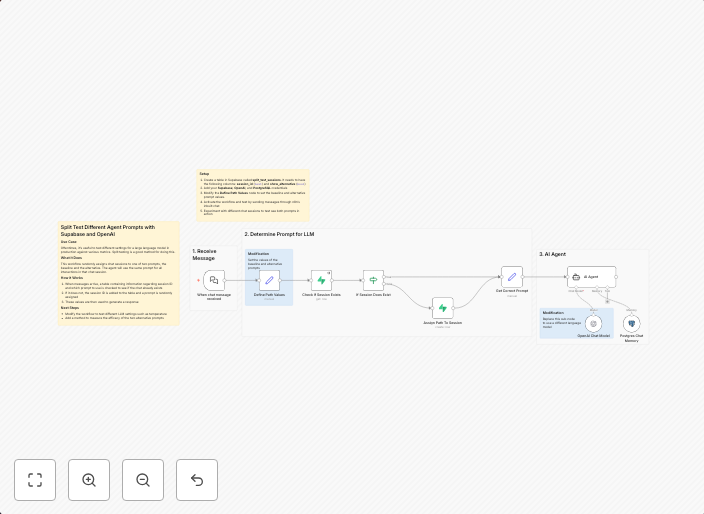
Split test different agent prompts with Supabase and OpenAI
Split Test Agent Prompts with Supabase and OpenAIUse CaseOftentimes, it's useful to test different settings for a large language model in production against...
Get This WorkflowAbout This Workflow
What This Workflow Does
This workflow enables you to split test different agent prompts with Supabase and OpenAI. By automating the process, you can easily compare the performance of various prompts and identify the most effective ones for your large language model in production. This workflow streamlines the A/B testing process and helps you make data-driven decisions.
Who Should Use This
This workflow is ideal for developers, AI/ML engineers, and chatbot administrators who want to optimize the performance of their OpenAI-based chatbots by testing different agent prompts.
Key Features
- Split Test Multiple Prompts: This workflow allows you to create multiple test groups with different agent prompts and send them to Supabase for analysis.
- Automated Prompt Testing: Easily test various prompts with OpenAI and compare their performance using Supabase as the data repository.
- Real-time Analysis: Get instant insights into the performance of each test group with Supabase's real-time analytics capabilities.
- Customizable Test Settings: Configure test settings such as test duration, sample size, and prompt variations to suit your specific needs.
How to Get Started
To use this workflow, simply import it into your n8n instance, customize the settings to match your Supabase and OpenAI credentials, and start testing different agent prompts. This workflow is designed to be flexible and adaptable, so feel free to modify it as needed to suit your specific use case.
Use This Workflow in n8n →Similar Workflows




Affiliate Disclosure: We may earn a commission if you sign up for n8n through our links. This doesn't affect our recommendations.