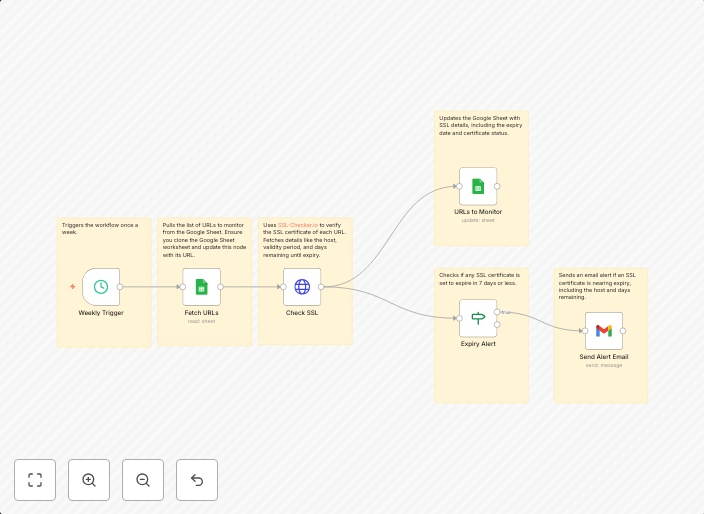
Ssl expiry alert with SSL-Checker.io
Use Case Managing SSL certificates manually can be time-consuming and error-prone, often leading to unexpected downtime or security risks due to expired...
Get This WorkflowAbout This Workflow
What This Workflow Does
This workflow, created by Igor Fediczko, uses the SSL-Checker.io integration to monitor SSL certificates and send alerts when they are about to expire. It automates the process of staying on top of SSL certificate renewal deadlines, reducing the risk of unexpected downtime or security vulnerabilities. By sending timely alerts, this workflow helps ensure that SSL certificates are renewed before they expire.
Who Should Use This
This workflow is designed for SecOps teams, system administrators, and IT professionals responsible for managing and maintaining SSL certificates across their organization.
Key Features
- Automated SSL Expiry Checks: This workflow regularly checks SSL certificates for upcoming expirations, giving you ample time to renew them.
- Customizable Alert Thresholds: Set the number of days before expiration to receive alerts, ensuring you stay on top of your renewal schedule.
- SSL-Checker.io Integration: Leverages the SSL-Checker.io API to fetch SSL certificate information and send alerts.
- Alert Notifications: Receive notifications via email or other channels to ensure timely action is taken.
How to Get Started
To use this workflow, simply import it into your n8n instance and customize the alert thresholds to suit your organization's needs. From there, you can rely on this automation to keep your SSL certificates up to date and secure.
Use This Workflow in n8n →Similar Workflows




Affiliate Disclosure: We may earn a commission if you sign up for n8n through our links. This doesn't affect our recommendations.