Store Gmail email details in MySQL database
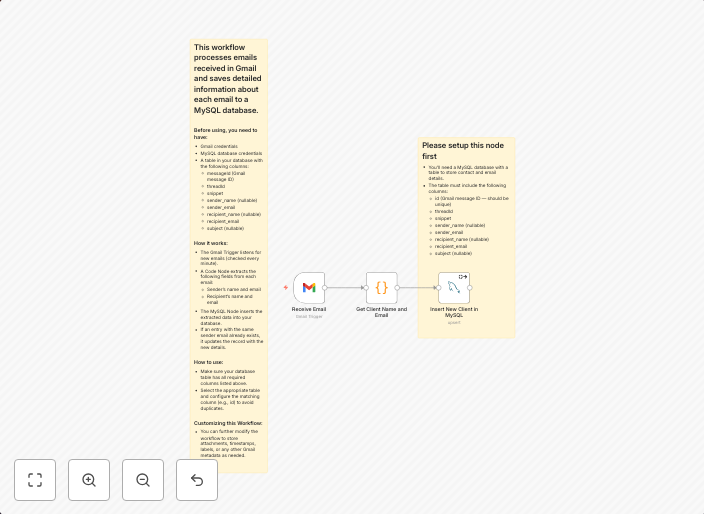
This workflow processes emails received in Gmail and saves detailed information about each email to a MySQL database. Before using, you need to have:Gmail...
Get This WorkflowAbout This Workflow
What This Workflow Does
This workflow automates the process of extracting relevant information from emails received in Gmail and storing it in a MySQL database. It provides a centralized repository for managing email details, making it easier to track and analyze email communications. The workflow saves time and effort by automatically processing and storing email data.
Who Should Use This
This workflow is ideal for developers, marketers, and business owners who rely on email communications for customer support, sales, or other business purposes. It is particularly useful for those who need to track and analyze email interactions, such as ticket management teams.
Key Features
- Connects to a Gmail account to retrieve incoming emails
- Extracts detailed information from each email, including sender, recipient, subject, and content
- Stores email data in a MySQL database for easy access and analysis
- Can be customized to fit specific business needs and requirements
How to Get Started
To use this workflow, simply import it into your n8n instance and connect it to your Gmail account and MySQL database. Customize the workflow as needed to fit your specific business requirements and data needs.
Use This Workflow in n8n →Similar Workflows




Affiliate Disclosure: We may earn a commission if you sign up for n8n through our links. This doesn't affect our recommendations.