Summarise MS Teams channel activity for weekly reports with AI
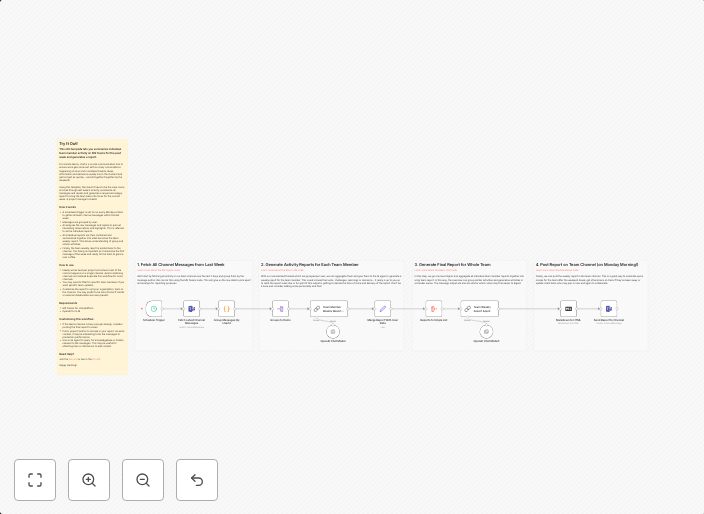
This n8n template lets you summarize individual team member activity on MS Teams for the past week and generates a report. For remote teams, chat is a...
Get This WorkflowAbout This Workflow
What This Workflow Does
This n8n template automates the process of summarizing individual team member activity on Microsoft Teams for the past week, utilizing AI to generate a report. The workflow aggregates chat data from MS Teams, applies AI-powered summarization, and formats the output into a concise and actionable report. This enables teams to stay on top of remote team activity and make informed decisions.
Who Should Use This
This workflow is ideal for project managers, team leads, and business owners who rely on remote teams and want to track activity, identify trends, and optimize collaboration. It's perfect for anyone who wants to streamline their reporting process and gain valuable insights from MS Teams chat data.
Key Features
- AI-powered summarization: The workflow uses AI to condense vast amounts of chat data into a readable report, saving time and effort.
- Individual team member activity tracking: The workflow aggregates data for each team member, allowing for personalized analysis and insights.
- MS Teams integration: The workflow seamlessly integrates with MS Teams, making it easy to connect and retrieve chat data.
- Customizable report output: The workflow can be tailored to fit your reporting needs, with options for modifying the summary format and content.
How to Get Started
To start using this workflow, simply import it into your n8n environment and configure the MS Teams integration by providing the necessary credentials. Customize the workflow settings to suit your reporting needs, and let the AI-powered summarization do the rest.
Use This Workflow in n8n →Similar Workflows




Affiliate Disclosure: We may earn a commission if you sign up for n8n through our links. This doesn't affect our recommendations.