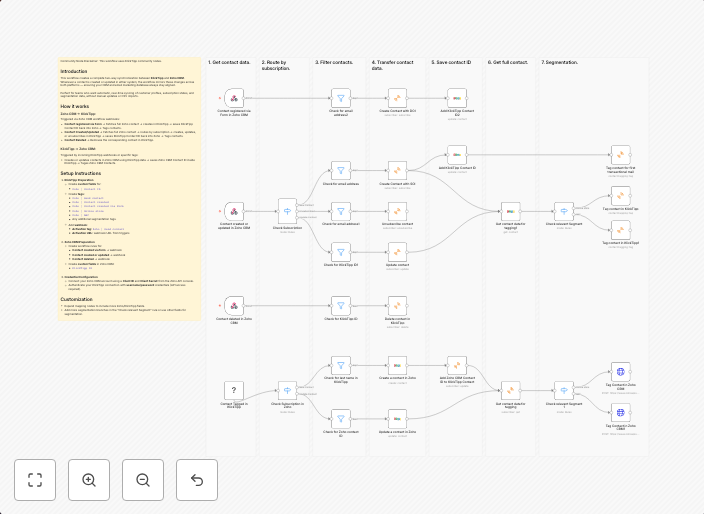
Sync contacts two-way between Zoho CRM and KlickTipp
Zoho CRM KlickTipp twoway sync Community Node Disclaimer: This workflow uses KlickTipp community nodes. IntroductionThis workflow creates a complete two-way...
Get This WorkflowAbout This Workflow
What This Workflow Does
This workflow provides a two-way synchronization between Zoho CRM and KlickTipp, allowing for seamless contact management across both platforms. It enables automatic updates, additions, and deletions of contacts between the two systems, ensuring data consistency and reducing manual data entry. By leveraging this workflow, users can focus on more strategic tasks while maintaining accurate and up-to-date customer information.
Who Should Use This
This workflow is ideal for businesses that rely on both Zoho CRM and KlickTipp for customer management and marketing automation. Developers, marketers, and business owners can leverage this workflow to streamline their contact management processes and enhance collaboration between teams.
Key Features
- Bi-directional Contact Sync: Automatically synchronize contacts between Zoho CRM and KlickTipp, including updates, additions, and deletions.
- Real-time Data Updates: Ensure that data is always up-to-date across both platforms, minimizing manual data entry and reducing errors.
- Customizable Mapping: Map custom fields and attributes between Zoho CRM and KlickTipp to meet specific business needs.
- Error Handling and Logging: Automatically handle errors and log events to enable troubleshooting and improve workflow reliability.
How to Get Started
To use this workflow, simply import it into your n8n instance and customize it to fit your specific business requirements. Configure the workflow to connect to your Zoho CRM and KlickTipp accounts, and review the node settings to ensure seamless integration with your existing systems.
Use This Workflow in n8n →Similar Workflows




Affiliate Disclosure: We may earn a commission if you sign up for n8n through our links. This doesn't affect our recommendations.