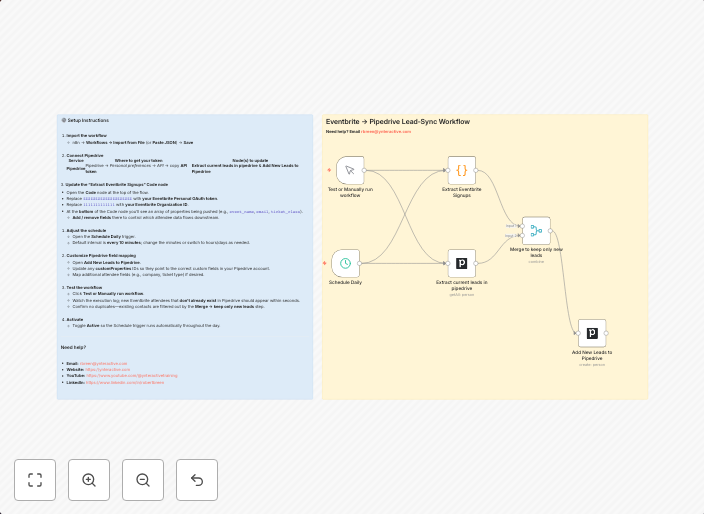
Sync event attendees from Eventbrite to Pipedrive automatically
Eventbrite → Pipedrive Lead‑Sync Bring your Eventbrite attendee data into Pipedrive automatically—no spreadsheets, CSVs, or manual uploads. 🚀 What the...
Get This WorkflowAbout This Workflow
What This Workflow Does
This workflow automatically syncs event attendees from Eventbrite to Pipedrive, streamlining the process of managing leads and events in your CRM. It brings in attendee data without the need for manual uploads or spreadsheets, saving time and reducing errors. By integrating these two platforms, you can get a clear view of event attendees and their interactions with your organization.
Who Should Use This
This workflow is ideal for business owners, event managers, and marketers who use Eventbrite for event registration and Pipedrive for CRM and lead management. They can benefit from the automation of attendee data syncing, gaining a better understanding of their events and customers.
Key Features
- Automated attendee data syncing: Eventbrite attendee data is automatically synced to Pipedrive, reducing manual effort and minimizing errors.
- Real-time updates: Attendee information is updated in Pipedrive as changes occur in Eventbrite, ensuring that your CRM is always up-to-date.
- No manual uploads needed: The workflow eliminates the need for manual CSV uploads, spreadsheets, or other manual processes.
- Integration of two platforms: This workflow integrates Eventbrite and Pipedrive, allowing you to manage events and leads from a single platform.
How to Get Started
To use this workflow, import it into your n8n account and customize it to fit your specific Eventbrite and Pipedrive settings. Follow the workflow's instructions to connect your accounts and set up the automation, and you'll be syncing event attendees in no time.
Use This Workflow in n8n →Similar Workflows




Affiliate Disclosure: We may earn a commission if you sign up for n8n through our links. This doesn't affect our recommendations.