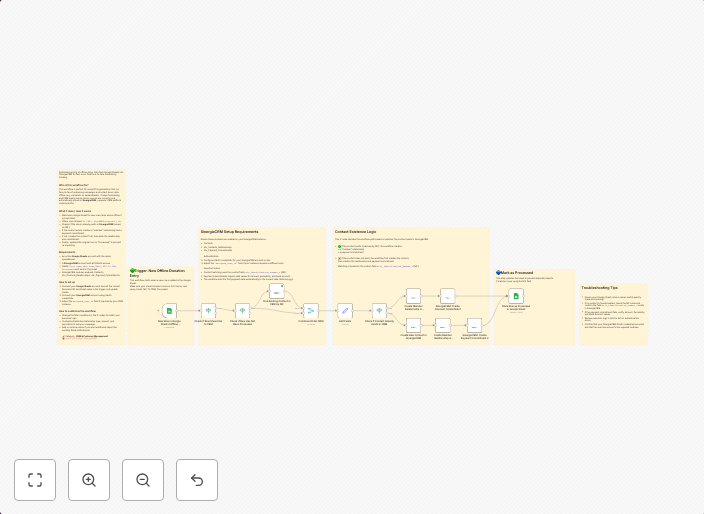
Sync face-to-face fundraising data from offline Google Sheets to SinergiaCRM
Automate syncing of offline donor data from Google Sheets into SinergiaCRM for fast, error-free face-to-face fundraising tracking. Who is this workflow...
Get This WorkflowAbout This Workflow
What This Workflow Does
This n8n automation workflow efficiently syncs offline face-to-face fundraising data from a Google Sheets document into SinergiaCRM, streamlining the process of tracking donors and reducing errors. By automating this task, organizations can save time and focus on more critical activities. The workflow ensures seamless integration between offline data collection and CRM systems.
Who Should Use This
This workflow is designed for organizations, developers, and marketers who utilize SinergiaCRM for face-to-face fundraising and rely on Google Sheets for data collection.
Key Features
- Automated Data Sync: Syncs offline donor data from Google Sheets into SinergiaCRM.
- Error-Free Tracking: Ensures accurate and up-to-date tracking of donors and interactions.
- Fast Integration: Quickly integrates offline data collection with CRM systems.
- Customizable: Allows users to tailor the workflow to their specific needs and data structure.
How to Get Started
To use this workflow in n8n, simply import it into your dashboard and customize the connections to your Google Sheets and SinergiaCRM accounts. Follow the in-workflow instructions for setting up the data mapping and authentication.
Use This Workflow in n8n →Similar Workflows




Affiliate Disclosure: We may earn a commission if you sign up for n8n through our links. This doesn't affect our recommendations.