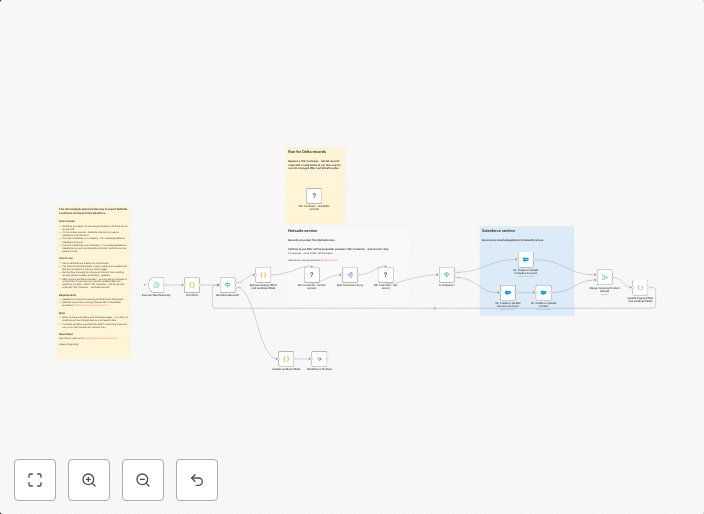
Sync NetSuite customers to Salesforce accounts & contacts with auto upserts
Short Description Automatically exports customer records from NetSuite and syncs them into Salesforce — creating or updating Accounts and Contacts depending...
Get This WorkflowAbout This Workflow
What This Workflow Does
This automation workflow exports customer records from NetSuite and synchronizes them into Salesforce. It creates or updates Accounts and Contacts as needed, ensuring that the data is consistent and up-to-date across both platforms. This workflow enables seamless data integration and reduces manual data entry efforts.
Who Should Use This
This workflow is ideal for businesses that use both NetSuite and Salesforce and want to automate customer data synchronization. It's particularly useful for sales, marketing, and customer success teams that rely on accurate and up-to-date customer information.
Key Features
- Auto Upsert: Creates or updates Accounts and Contacts in Salesforce based on existing customer records in NetSuite.
- Data Synchronization: Ensures that customer data is consistent and up-to-date across both NetSuite and Salesforce.
- Effortless Data Integration: Automates the process of exporting customer records from NetSuite and importing them into Salesforce.
- Customizable: Can be easily customized to fit specific business needs and requirements.
How to Get Started
To use this workflow, simply import it into your n8n instance and customize it to match your business requirements. You can then set up the workflow to run automatically, ensuring that customer data is synchronized between NetSuite and Salesforce with minimal effort.
Use This Workflow in n8n →Similar Workflows




Affiliate Disclosure: We may earn a commission if you sign up for n8n through our links. This doesn't affect our recommendations.