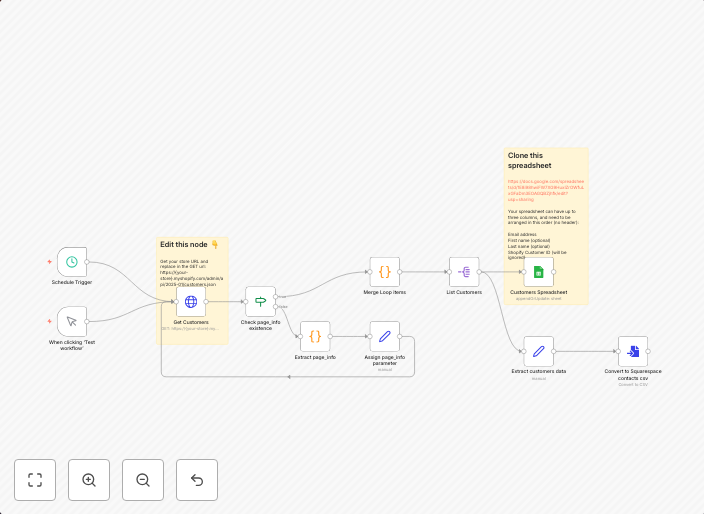
Sync Shopify customers to Google Sheets + Squarespace compatible csv
This workflow retrieves all Shopify Customers and saves them into a Google Sheets spreadsheet using the Shopify Admin REST API. It uses pagination to ensure...
Get This WorkflowAbout This Workflow
What This Workflow Does
This workflow automates the synchronization of Shopify customers to a Google Sheets spreadsheet, creating a compatible CSV file for import into Squarespace. It leverages the Shopify Admin REST API for data retrieval and utilizes pagination for efficient data handling. By syncing customer data, businesses can maintain a centralized and up-to-date customer database.
Who Should Use This
This workflow is ideal for e-commerce business owners, marketers, and developers who want to streamline their customer data management and utilize it across multiple platforms, such as Google Sheets and Squarespace.
Key Features
- Retrieves all Shopify customers using the Admin REST API
- Saves customer data to a Google Sheets spreadsheet
- Utilizes pagination for efficient data handling
- Generates a compatible CSV file for import into Squarespace
How to Get Started
To start using this workflow in n8n, import it into your workflow library and customize the settings to connect to your Shopify and Google Sheets accounts. Configure the workflow to retrieve the desired customer data and set up the CSV export for Squarespace import.
Use This Workflow in n8n →Similar Workflows




Affiliate Disclosure: We may earn a commission if you sign up for n8n through our links. This doesn't affect our recommendations.