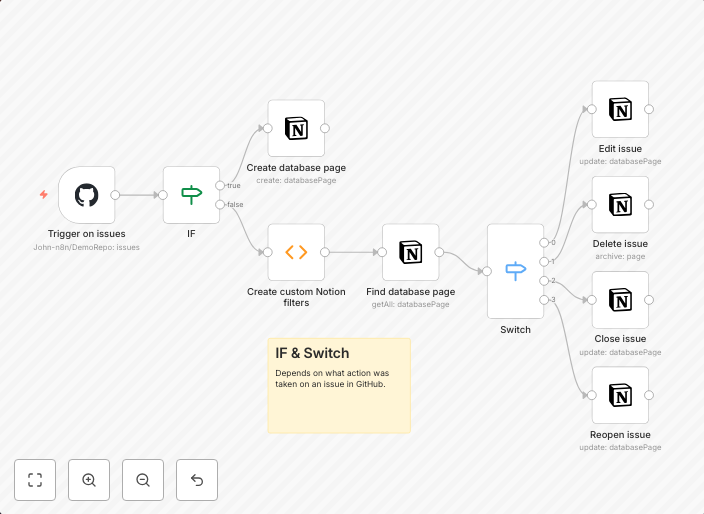
Sync your GitHub issues to your Notion database
This workflow syncs your GitHub issues to your Notion database. Whenever a new issue is opened in your GitHub repository, it will be shown in your Notion...
Get This WorkflowAbout This Workflow
What This Workflow Does
This workflow automatically syncs new GitHub issues to your Notion database, providing real-time visibility into your repository's issues and allowing you to track and manage them in a centralized location. It helps to streamline your project management workflow by keeping all relevant information in one place. The workflow ensures that new GitHub issues are reflected in your Notion database without requiring manual input.
Who Should Use This
Developers, project managers, and business owners who use GitHub for version control and Notion for project management can benefit from this workflow. It is particularly useful for teams that need to track and manage multiple issues across different repositories.
Key Features
- Automated GitHub Issue Syncing: New GitHub issues are automatically added to your Notion database, ensuring that all relevant information is up-to-date.
- Real-time Visibility: The workflow provides real-time visibility into your repository's issues, allowing you to track progress and make informed decisions.
- Centralized Issue Management: By syncing issues to Notion, you can manage them in a centralized location, eliminating the need to switch between multiple tools.
- No Manual Input Required: The workflow reduces the administrative burden by automating the process of adding new issues to your Notion database.
How to Get Started
To use this workflow, import it into your n8n account and customize the GitHub and Notion integrations to match your specific project settings. Configure the workflow to connect to your GitHub repository and Notion database, and you're ready to start syncing your issues in real-time.
Use This Workflow in n8n →Similar Workflows

Affiliate Disclosure: We may earn a commission if you sign up for n8n through our links. This doesn't affect our recommendations.