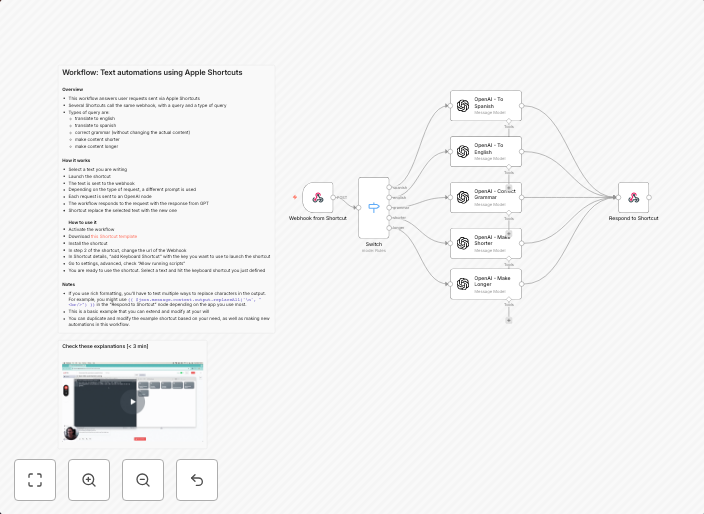
Text automations using Apple Shortcuts
OverviewThis workflow answers user requests sent via Mac ShortcutsSeveral Shortcuts call the same webhook, with a query and a type of queryTypes of query...
Get This WorkflowAbout This Workflow
What This Workflow Does
This workflow automates interactions with user requests sent via Mac Shortcuts by connecting multiple Shortcuts to a single webhook, allowing for efficient query management and response generation. It differentiates between various query types, enabling tailored responses. The automation streamlines the process of handling user requests, enhancing productivity.
Who Should Use This
This workflow is suitable for developers, marketers, and business owners who rely on Mac Shortcuts for user engagement and want to optimize their query management processes, saving time and improving customer satisfaction.
Key Features
- Multimodal AI Integration: Connects Mac Shortcuts with a webhook, enabling the automation of user requests across multiple shortcuts.
- Query Differentiation: Distinguishes between various query types, allowing for customized responses and improved user experience.
- Efficient Query Management: Streamlines the process of handling user requests, reducing manual effort and enhancing productivity.
- Webhook Integration: Allows for seamless interaction with external services and systems, expanding automation possibilities.
How to Get Started
To utilize this workflow, import it into your n8n environment and customize the webhook settings to match your specific requirements. Configure the workflow to connect with your chosen multimodal AI service, enabling the automation of user requests sent via Mac Shortcuts.
Use This Workflow in n8n →Similar Workflows




Affiliate Disclosure: We may earn a commission if you sign up for n8n through our links. This doesn't affect our recommendations.