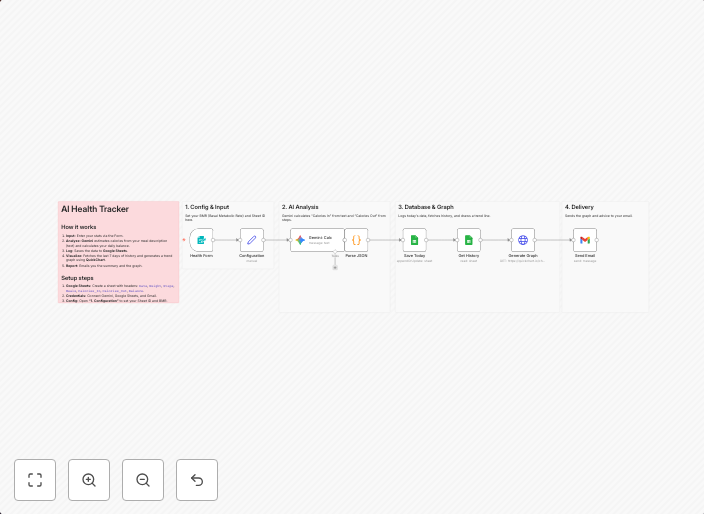
Track calories and weight using Gemini, Google Sheets, Gmail and QuickChart
Description: I built this because manual calorie counting apps are too tedious. 🥗📉 Logging food by searching for "Banana medium size" in an app takes too...
Get This WorkflowAbout This Workflow
What This Workflow Does
This workflow automates the process of tracking calories and weight by integrating Gemini, Google Sheets, Gmail, and QuickChart. It enables users to log food intake and receive visualized updates on their weight and calorie consumption over time. The workflow streamlines the process, reducing the need for manual data entry and tedious calorie counting.
Who Should Use This
This workflow is ideal for individuals who want to track their diet and weight in a more efficient and automated way. It is particularly useful for fitness enthusiasts, health-conscious individuals, and anyone looking to monitor their calorie intake and weight.
Key Features
- Automated food logging: Users can send emails to a designated Gmail address with food items and quantities, which are then logged in Google Sheets.
- Visualized data: QuickChart integrates with the workflow to generate a chart displaying the user's weight and calorie consumption over time.
- Integration with Gemini: Users can search for food items in Gemini, and the workflow will automatically log the item in Google Sheets.
How to Get Started
To use this workflow, import it into your n8n account and customize the Gmail address, Google Sheets spreadsheet, and QuickChart credentials to suit your needs. Adjust the workflow settings to fit your specific requirements, and you're ready to start tracking your diet and weight with ease.
Use This Workflow in n8n →Similar Workflows




Affiliate Disclosure: We may earn a commission if you sign up for n8n through our links. This doesn't affect our recommendations.