Track TikTok Ads Library with Apify, Google Sheets & Slack/Telegram Notifications
This workflow continuously monitors the TikTok Ads Library for new creatives from specific advertisers or keyword searches, scrapes them via Apify, logs...
Get This WorkflowAbout This Workflow
What This Workflow Does
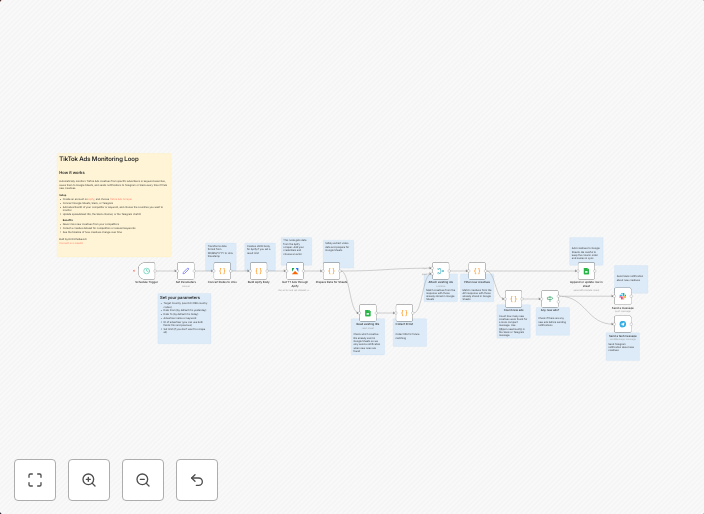
This workflow continuously monitors the TikTok Ads Library for new creatives from specific advertisers or keyword searches. It scrapes the data using Apify and logs it, allowing users to track and analyze the latest ad campaigns on TikTok. The workflow also sends notifications to Slack or Telegram, alerting users to new data.
Who Should Use This
This workflow is ideal for market researchers, social media marketers, and business owners looking to stay up-to-date with the latest trends and developments in the TikTok advertising space. It requires some technical knowledge, making it suitable for developers and marketers with experience using automation tools.
Key Features
- Continuously monitors the TikTok Ads Library for new creatives from specific advertisers or keyword searches
- Scrapes data using Apify for efficient and reliable information gathering
- Logs new data for easy analysis and tracking
- Sends notifications to Slack or Telegram when new data is available
- Can be customized to track specific advertisers or keywords
How to Get Started
To use this workflow, import it into n8n and customize the settings to fit your specific needs. This includes specifying the advertisers, keywords, and notification channels you want to use.
Use This Workflow in n8n →Similar Workflows




Affiliate Disclosure: We may earn a commission if you sign up for n8n through our links. This doesn't affect our recommendations.