Transform images with AI image editor using FLUX.1 Kontext
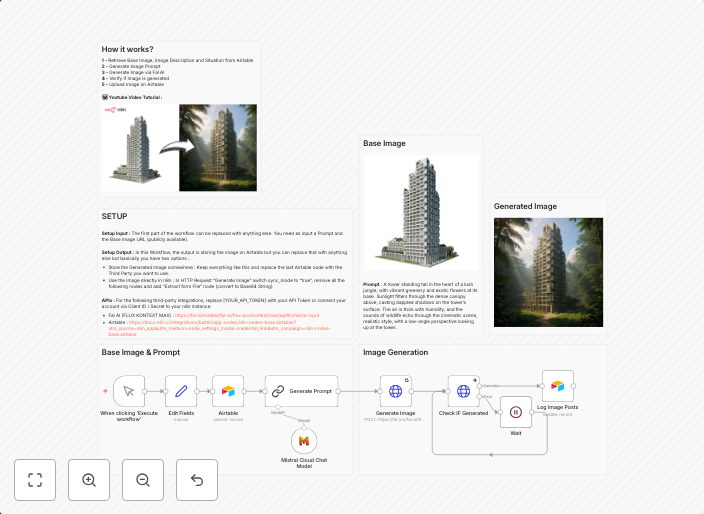
For Who? Content CreatorsYoutube AutomationMarketing Team How it works? 1 - Retrieve Base Image, Image Description and Situation from Airtable2 - Generate...
Get This WorkflowAbout This Workflow
What This Workflow Does
This workflow leverages the FLUX.1 Kontext integration to transform images using AI-powered image editing. It automates the process of enhancing images with relevant descriptions and context. The outcome is a high-quality image ready for use in various content creation scenarios.
Who Should Use This
Content creators, marketing teams, and individuals who rely on high-quality images for their content can benefit from this workflow. It's ideal for those who want to streamline their image editing process and save time.
Key Features
- Retrieves a base image, its description, and situation from Airtable to inform the AI image editing process
- Uses AI-powered image editing to enhance and transform the image
- Generates the final image with relevant context and description
- Automates a time-consuming and labor-intensive process, freeing up creators for more important tasks
How to Get Started
To use this workflow, simply import it into your n8n instance and configure the Airtable connection to retrieve the necessary data. You can then customize the workflow to suit your specific needs and image editing requirements.
Use This Workflow in n8n →Similar Workflows




Affiliate Disclosure: We may earn a commission if you sign up for n8n through our links. This doesn't affect our recommendations.