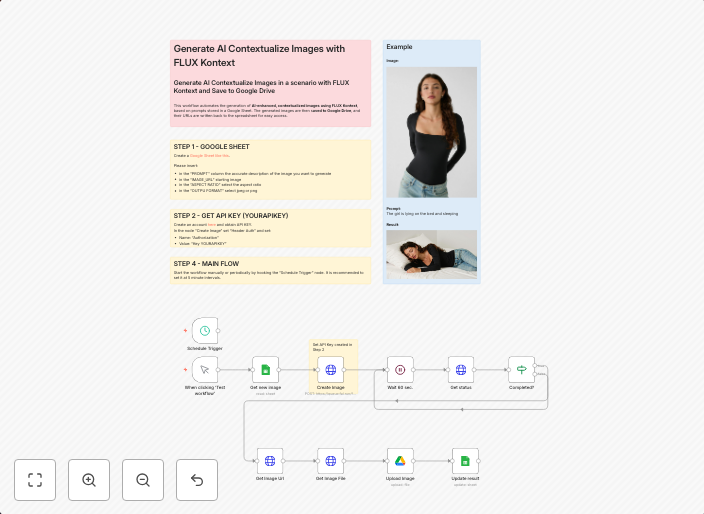
Transform images with AI prompts using FLUX Kontext, Google Sheets and Drive
This workflow automates the generation of AI-enhanced, contextualized images using FLUX Kontext, based on prompts stored in a Google Sheet. The generated...
Get This WorkflowAbout This Workflow
What This Workflow Does
This workflow automates the generation of AI-enhanced images using FLUX Kontext, based on user-defined prompts stored in a Google Sheet. It transforms these prompts into contextualized images, saving time and effort in content creation processes. The generated images can be stored directly in Google Drive, making them easily accessible for various applications.
Who Should Use This
This workflow is ideal for content creators, marketers, and business owners who require high-quality, context-specific images for their marketing materials, social media, or websites. Whether you're a developer or a non-technical user, this workflow offers a user-friendly way to leverage AI-generated images for your content needs.
Key Features
- AI Image Generation: Automatically generates AI-enhanced, contextualized images using FLUX Kontext based on user-defined prompts.
- Google Sheet Integration: Stores and retrieves prompts from a Google Sheet, making it easy to update and manage your content library.
- Google Drive Storage: Stores the generated images directly in Google Drive for easy access and sharing.
How to Get Started
To get started with this workflow, import it into your n8n instance and customize the Google Sheet and Drive connections to fit your specific content needs. You can then define your AI prompts and watch as the workflow generates high-quality, context-specific images for your content creation projects.
Use This Workflow in n8n →Similar Workflows




Affiliate Disclosure: We may earn a commission if you sign up for n8n through our links. This doesn't affect our recommendations.