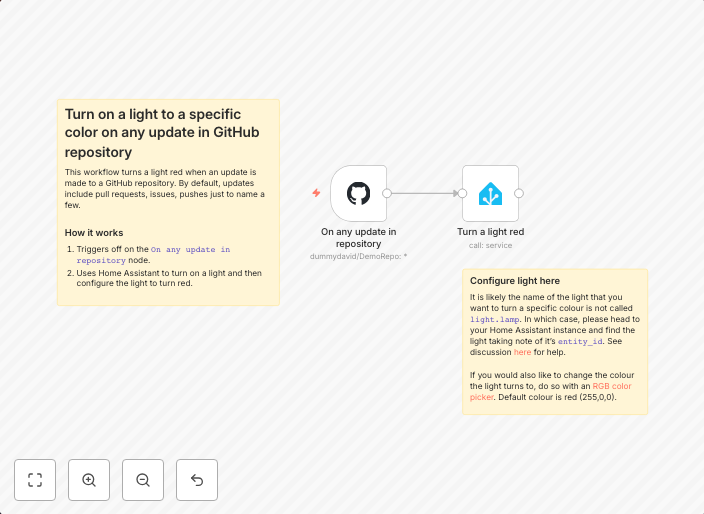
Turn on a light to a specific color on any update in GitHub repository
This workflow turns a light red when an update is made to a GitHub repository. By default, updates include pull requests, issues, pushes just to name a few....
Get This WorkflowAbout This Workflow
What This Workflow Does
This workflow automates the task of turning on a light to a specific color whenever there's an update in a GitHub repository. It monitors various types of updates, including pull requests, issues, and pushes, to ensure you're notified of any changes. The workflow provides a real-time indication of activity in your GitHub repository.
Who Should Use This
This workflow is ideal for developers, DevOps engineers, and team leads who want to stay informed about changes in their GitHub repository. It's perfect for anyone who wants to receive instant visual notifications of updates.
Key Features
- Real-time updates: The workflow automatically detects and notifies you of any changes in your GitHub repository, including pull requests, issues, and pushes.
- Customizable: Although this workflow is pre-made, you can easily customize it to fit your specific needs and preferences.
- Easy to use: Simply import the workflow into your n8n instance and configure the necessary connections to your GitHub repository.
- Simple visual feedback: The workflow turns on a light to a specific color (red in this case), providing a clear and immediate indication of repository activity.
How to Get Started
To use this workflow, import it into your n8n instance and configure the connections to your GitHub repository. You can then customize the workflow to meet your specific needs, such as changing the light color or adding additional notifications.
Use This Workflow in n8n →Similar Workflows

Affiliate Disclosure: We may earn a commission if you sign up for n8n through our links. This doesn't affect our recommendations.