UX interview analysis with OpenAI: transcribe and export to Google Sheets
UX Interview Analysis with OpenAI: Transcipt, Summarize, and Export to Google Sheets! AboutEasily analyze and summarize UX interviews. Just upload your...
Get This WorkflowAbout This Workflow
What This Workflow Does
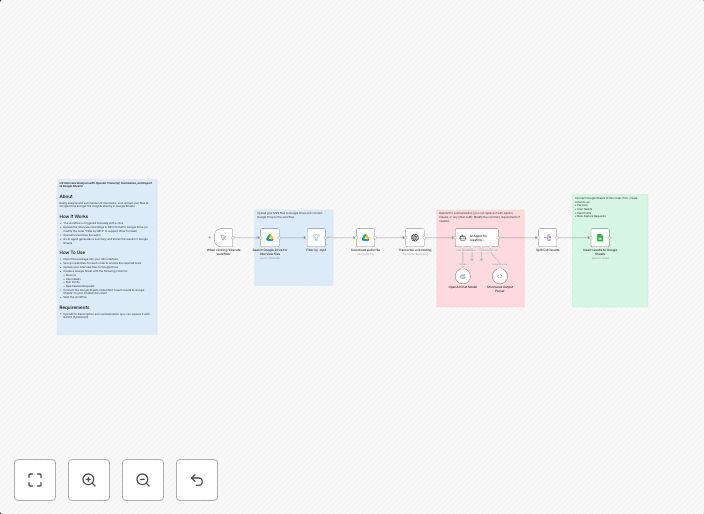
This workflow automates the process of analyzing UX interviews using OpenAI, transcribing the audio, summarizing the main points, and exporting the results to Google Sheets. It streamlines the analysis process, saving time and effort. The workflow can be easily customized to fit specific needs.
Who Should Use This
This workflow is ideal for UX researchers, product managers, and market researchers who need to efficiently analyze and summarize large amounts of interview data. It's also useful for marketers and business owners who want to gain insights from customer feedback.
Key Features
- Uploads UX interview audio files to OpenAI for transcription and analysis
- Summarizes the main points from the interview using OpenAI AI Summarization
- Exports the summarized results to a Google Sheet for easy access and analysis
- Allows for customization of the workflow to fit specific needs and data requirements
How to Get Started
To use this workflow, simply import it into your n8n account and customize the settings to fit your specific use case. You'll need to connect your OpenAI and Google Sheets accounts to the workflow, and then upload your UX interview audio files for analysis.
Use This Workflow in n8n →Similar Workflows




Affiliate Disclosure: We may earn a commission if you sign up for n8n through our links. This doesn't affect our recommendations.