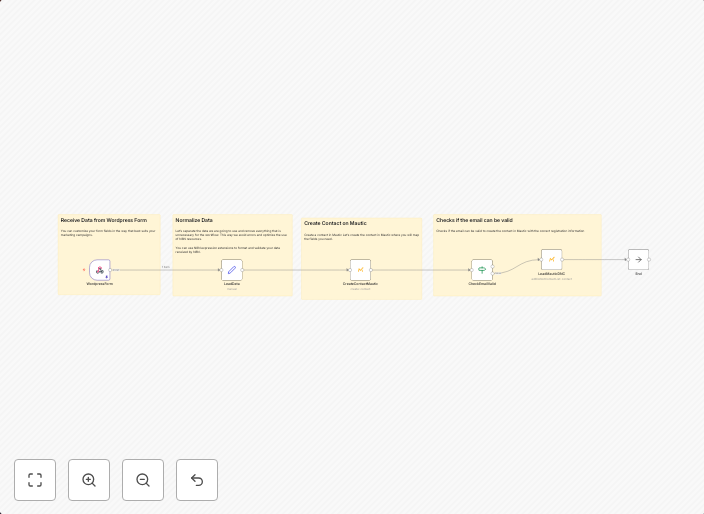
Validate email format from a Wordpress form and save a contact in Mautic
When you collect leads from a form, you need to format the incoming data such as the lead's name and also apply a basic validation of the email entered....
Get This WorkflowAbout This Workflow
What This Workflow Does
This workflow collects lead data from a Wordpress form, formats the incoming data, and validates the email format. It then saves the validated contact information in Mautic. The workflow ensures that only valid email addresses are saved in Mautic, reducing potential errors and maintaining data quality.
Who Should Use This
This workflow is designed for marketers, business owners, and developers who need to automate lead generation and contact management in their Wordpress-based websites using Mautic.
Key Features
- Format incoming data: The workflow formats the lead's name and other fields to ensure consistency in the data.
- Validate email format: It checks the email address for correctness, preventing incorrect or invalid email addresses from being saved in Mautic.
- Save contact in Mautic: The validated contact information is saved in Mautic for future use and marketing campaigns.
- Lead generation automation: The workflow automates the process of collecting and validating lead data from Wordpress forms, making it easier to manage leads and contacts.
How to Get Started
To use this workflow, simply import it in n8n, connect your Wordpress and Mautic integrations, and customize the workflow settings to match your specific requirements. Follow the on-screen instructions to set up the workflow and start automating your lead generation process.
Use This Workflow in n8n →Similar Workflows




Affiliate Disclosure: We may earn a commission if you sign up for n8n through our links. This doesn't affect our recommendations.