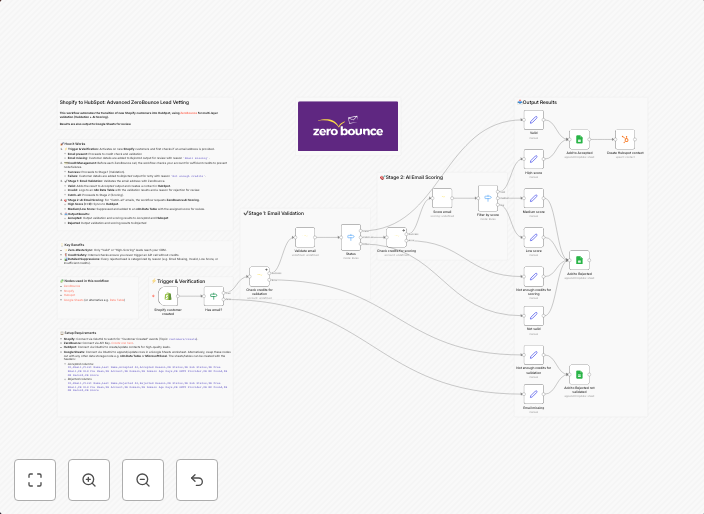
Vet new Shopify leads with ZeroBounce and sync qualified contacts to HubSpot
Shopify to HubSpot: Advanced ZeroBounce Lead Vetting This workflow automates the transition of new Shopify customers into HubSpot, using ZeroBounce for...
Get This WorkflowAbout This Workflow
What This Workflow Does
This workflow automates the process of vetting new Shopify leads using ZeroBounce and syncing qualified contacts to HubSpot. It streamlines the lead management process by integrating three key tools: Shopify, ZeroBounce, and HubSpot. By automating this process, businesses can reduce manual effort and improve data quality.
Who Should Use This
This workflow is ideal for marketers and business owners who use Shopify for e-commerce and HubSpot for CRM and lead management. It's especially useful for those who want to ensure that their leads are high-quality and qualified.
Key Features
- Lead Vetting with ZeroBounce: This workflow uses ZeroBounce to verify the email addresses of new Shopify leads, helping to reduce bounced emails and improve deliverability.
- Advanced Email Validation: ZeroBounce's advanced email validation features are used to check for typos, syntax errors, and other issues that can impact deliverability.
- Sync Qualified Contacts to HubSpot: Qualified leads are then synced to HubSpot, where they can be used for lead nurture campaigns, sales outreach, and other marketing efforts.
- Integration with Shopify: The workflow is triggered by new customers in Shopify, making it easy to automate the lead management process.
How to Get Started
To get started with this workflow, simply import it into your n8n account and customize the settings to fit your business needs. You'll need to connect your Shopify and HubSpot accounts, as well as set up a ZeroBounce API key. With these simple steps, you'll be able to start automating your lead management process and improving your lead quality.
Use This Workflow in n8n →Similar Workflows




Affiliate Disclosure: We may earn a commission if you sign up for n8n through our links. This doesn't affect our recommendations.