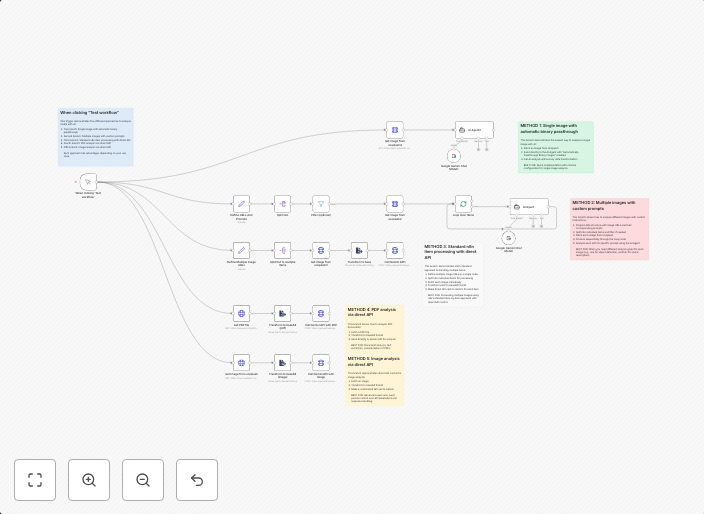
5 ways to process images & PDFs with Gemini AI in n8n
How it works Many users have asked in the support forum about different methods to analyze images and PDF documents with Google Gemini AI in n8n. This...
Get This WorkflowAbout This Workflow
What This Workflow Does
This workflow demonstrates five different methods for processing images and PDFs using the Google Gemini AI integration in n8n. It showcases various approaches for analyzing and extracting information from these document types, providing a comprehensive resource for users. By automating these processes, users can streamline their workflows and gain valuable insights.
Who Should Use This
This workflow is ideal for developers, marketers, and business owners who work with images and PDFs on a regular basis and want to leverage the power of AI for analysis and processing.
Key Features
- Image Analysis: The workflow includes examples of how to use Gemini AI for image recognition, classification, and object detection.
- PDF Document Extraction: Users can learn how to extract text and data from PDF documents using Gemini AI, enabling them to automate tasks such as data entry and document processing.
- Multimodal AI Integration: The workflow showcases the integration of Gemini AI with other n8n integrations, allowing users to combine AI with other data sources and tools.
- Customizable Workflows: Each example in the workflow can be customized and extended to fit the specific needs of the user, making it a versatile resource for automating complex tasks.
How to Get Started
To use this workflow, simply import it into your n8n account and customize the nodes to fit your specific use case. You can then connect your own data sources and integrations to create a tailored automation workflow that meets your needs.
Use This Workflow in n8n →Similar Workflows




Affiliate Disclosure: We may earn a commission if you sign up for n8n through our links. This doesn't affect our recommendations.