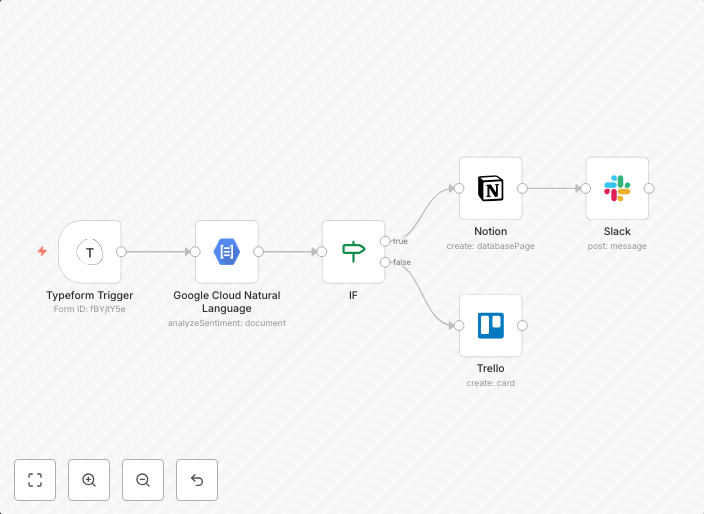
Add positive feedback messages to a table in Notion
This workflow allows you to add positive feedback messages to a table in Notion. PrerequisitesCreate a Typeform that contains Long Text filed question type...
Get This WorkflowAbout This Workflow
What This Workflow Does
This workflow automates the process of adding positive feedback messages to a table in Notion. It collects feedback through a Typeform and utilizes AI summarization to analyze the responses. The workflow then populates a table in Notion with the summarized feedback, making it easier to track and analyze customer opinions.
Who Should Use This
This workflow is ideal for businesses, marketers, and customer success teams looking to streamline their feedback collection and analysis processes. It helps them save time and gain valuable insights into customer opinions, which can inform product development and improvement decisions.
Key Features
- Collects feedback from customers using a Typeform with a long text field question type
- Utilizes AI summarization to analyze and summarize lengthy customer responses
- Populates a table in Notion with the summarized feedback for easy tracking and analysis
- Automates the process of adding positive feedback messages to the Notion table
How to Get Started
To get started with this workflow, simply import it into your n8n account and customize the Typeform and Notion integrations to fit your specific needs. Follow the on-screen prompts to connect your Typeform and Notion accounts, and you'll be ready to start collecting and analyzing customer feedback.
Use This Workflow in n8n →Similar Workflows




Affiliate Disclosure: We may earn a commission if you sign up for n8n through our links. This doesn't affect our recommendations.