AI-powered CV filtering with Llama3.1 LLM, Google Drive & Sheets
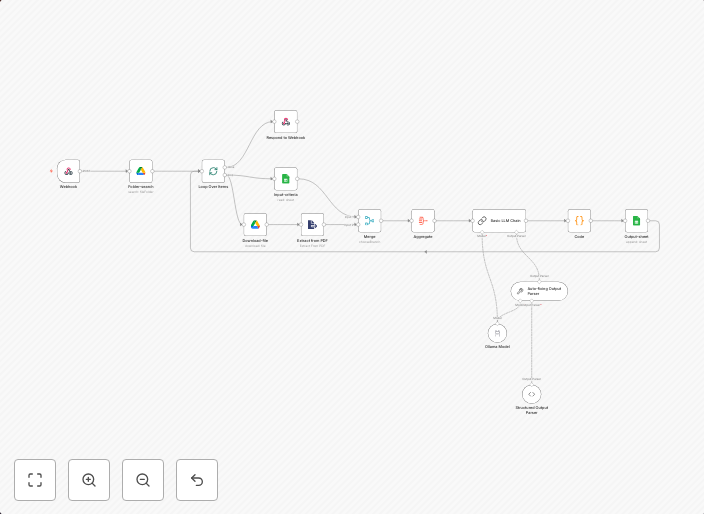
This visual workflow represents an AI-powered automated CV filtering system created using tools like n8n, Google Drive, Google Sheets, and Ollama (LLM) ⚙️...
Get This WorkflowAbout This Workflow
What This Workflow Does
This workflow uses AI-powered natural language processing (NLP) through the Llama3.1 Large Language Model (LLM) to filter and process resumes stored in Google Drive, and then summarizes and organizes the data in a Google Sheets document. The automation helps streamline the hiring process by automatically filtering and categorizing candidate resumes based on relevant information. This saves time and increases efficiency for HR teams and recruiters.
Who Should Use This
This workflow is ideal for HR teams, recruiters, and hiring managers who want to automate the resume filtering process and make data-driven decisions during the hiring process.
Key Features
- LLM-powered resume analysis: The workflow uses Llama3.1 to analyze and extract relevant information from resumes stored in Google Drive.
- Automated data organization: The workflow automatically organizes and summarizes the extracted data in a Google Sheets document for easy access and analysis.
- Customizable filtering: Users can customize the workflow to filter resumes based on specific keywords, skills, or requirements.
- Integration with Google Drive and Sheets: The workflow seamlessly integrates with Google Drive for resume storage and Google Sheets for data organization and analysis.
How to Get Started
To get started with this workflow, simply import it into your n8n account and customize it to fit your specific needs by updating the Google Drive and Sheets credentials, as well as the LLM settings.
Use This Workflow in n8n →Similar Workflows




Affiliate Disclosure: We may earn a commission if you sign up for n8n through our links. This doesn't affect our recommendations.