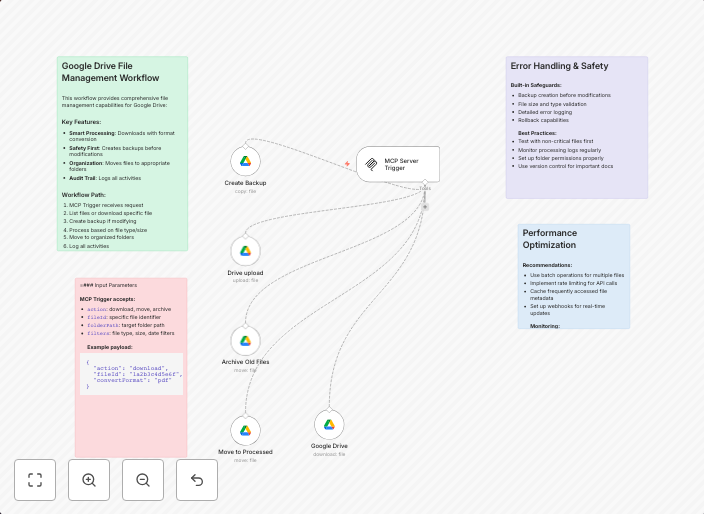
AI-powered file management automation for Google Drive with MCP
This workflow contains community nodes that are only compatible with the self-hosted version of n8n. 📁 Google Drive MCP Workflow – AI-Powered File...
Get This WorkflowAbout This Workflow
What This Workflow Does
This workflow automates file management tasks on Google Drive using Machine Learning (AI) and the MCP (Multi-Cloud Provider) connector, which is exclusive to the self-hosted version of n8n. It enables users to leverage AI-powered features to organize, categorize, and manage files on Google Drive in a more efficient and intelligent manner. The workflow utilizes community nodes, which are not available in the cloud version of n8n.
Who Should Use This
This workflow is suitable for IT administrators, developers, and power users who manage large volumes of files on Google Drive and want to leverage AI-powered automation to streamline their file management processes.
Key Features
- AI-powered file categorization: Uses machine learning to automatically categorize files into predefined folders based on their content and metadata.
- Smart file organization: Employs AI to suggest optimal folder structures and file naming conventions for improved organization and discovery.
- Automated file backup and archiving: Uses the MCP connector to automatically backup and archive files to other cloud storage services, ensuring business continuity and compliance.
How to Get Started
To use this workflow, you'll need to import it into your self-hosted n8n instance. Once imported, you can customize the workflow by adjusting the node settings and adding more steps to suit your specific file management needs.
Use This Workflow in n8n →Similar Workflows




Affiliate Disclosure: We may earn a commission if you sign up for n8n through our links. This doesn't affect our recommendations.