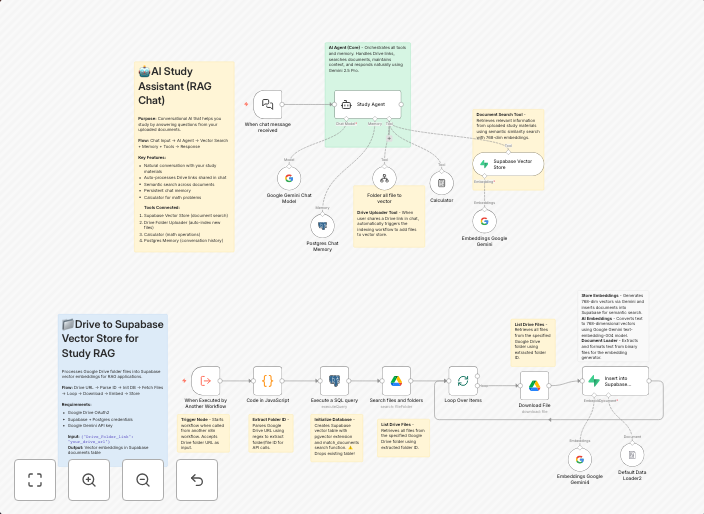
AI study assistant with RAG - Google Gemini with Drive & Supabase vector search
How it works A complete AI-powered study assistant system that lets you chat naturally with your documents stored in Google Drive: The system has two...
Get This WorkflowAbout This Workflow
What This Workflow Does
This AI-powered study assistant workflow integrates Google Gemini with Google Drive and Supabase vector search, enabling natural chat interactions with documents stored in Google Drive. It utilizes RAG (Red, Amber, Green) labeling to categorize and prioritize study materials. The workflow automates the process of managing and accessing study content.
Who Should Use This
This workflow is ideal for students, researchers, and professionals seeking to streamline their study and research processes using AI-powered automation.
Key Features
- Integrates Google Gemini with Google Drive for natural chat interactions with documents
- Utilizes RAG labeling to categorize and prioritize study materials
- Leverages Supabase vector search for efficient content retrieval
- Enhances study and research productivity through automation
How to Get Started
To use this workflow, import it into your n8n instance and customize the Google Drive, Google Gemini, and Supabase integrations according to your specific needs. Adjust the RAG labeling and search settings to fit your study and research workflow.
Use This Workflow in n8n →Similar Workflows




Affiliate Disclosure: We may earn a commission if you sign up for n8n through our links. This doesn't affect our recommendations.