Analyze images & PDFs from Google Drive with Gemini 3 AI
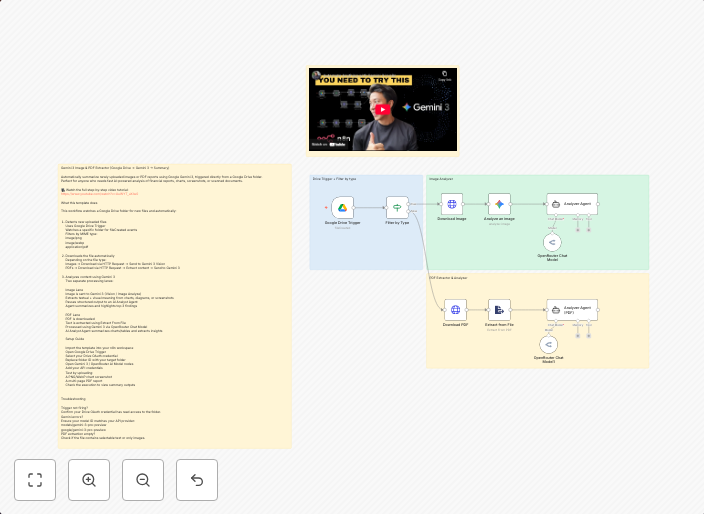
Gemini 3 Image & PDF Extractor (Google Drive → Gemini 3 → Summary) Automatically summarize newly uploaded images or PDF reports using Google Gemini 3,...
Get This WorkflowAbout This Workflow
What This Workflow Does
Automatically analyzes newly uploaded images and PDF reports from Google Drive, extracts relevant information using Gemini 3 AI, and generates a summary of the content. This workflow streamlines the process of extracting insights from images and PDFs, saving time and increasing productivity. By leveraging AI-powered document extraction, users can quickly access key information without manual processing.
Who Should Use This
This workflow is ideal for business owners, marketers, and developers looking to automate the analysis of images and PDF reports stored in Google Drive. Anyone who frequently deals with large volumes of image and PDF data can benefit from this automation.
Key Features
- Automated Image and PDF Analysis: The workflow automatically detects and analyzes newly uploaded images and PDFs from Google Drive.
- AI-Powered Document Extraction: Gemini 3 AI is used to extract relevant information from the analyzed images and PDFs.
- Summary Generation: A concise summary of the content is generated, providing quick access to key insights.
- Integration with Google Drive: The workflow seamlessly integrates with Google Drive, allowing users to access and analyze files directly from their cloud storage.
How to Get Started
To use this workflow, simply import it into your n8n account and connect your Google Drive and Gemini 3 accounts to the workflow. Customize the workflow settings as needed to fit your specific requirements, and enjoy the benefits of automated image and PDF analysis.
Use This Workflow in n8n →Similar Workflows




Affiliate Disclosure: We may earn a commission if you sign up for n8n through our links. This doesn't affect our recommendations.