Auto-convert OneDrive Word documents to PDF with Foxit and send via Gmail
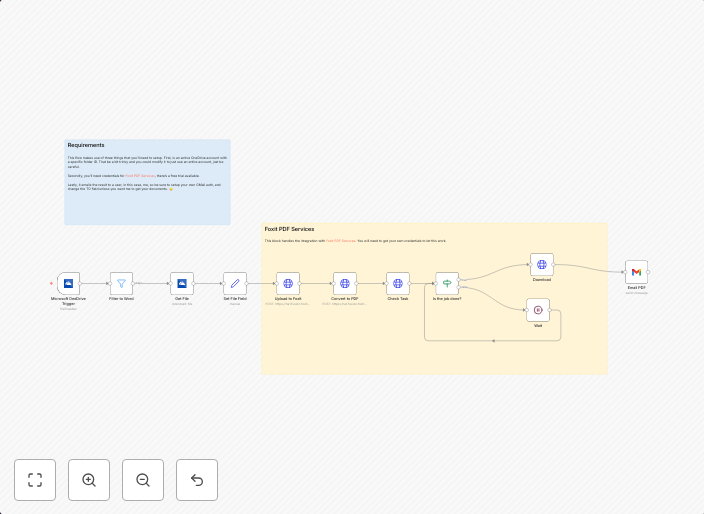
This n8n template demonstrates how to add a document conversion process to incoming Word documents in a OneDrive folder. Documents are converted to PDF and...
Get This WorkflowAbout This Workflow
What This Workflow Does
This n8n template automates the process of converting incoming Word documents from a OneDrive folder to PDF format using Foxit, and then sends the converted PDF files via Gmail. The workflow streamlines document conversion and sharing, saving time and effort. It's a powerful tool for teams and individuals looking to automate repetitive document management tasks.
Who Should Use This
This workflow is ideal for developers, marketers, and business owners who frequently work with Microsoft Word documents and need to share them in a standardized, easily accessible format. It's particularly useful for teams and organizations that rely heavily on document sharing and collaboration.
Key Features
- Automated document conversion: The workflow converts incoming Word documents to PDF format using Foxit, ensuring consistency and accessibility.
- Seamless integration with OneDrive: The template connects directly to OneDrive folders, allowing you to monitor and convert files in real-time.
- Customizable email sharing: You can easily configure the workflow to send converted PDF files via Gmail, ensuring that your team or clients receive the latest documents on time.
How to Get Started
To use this template, simply import it into your n8n workflow editor and customize the settings to match your OneDrive and Gmail configurations. From there, you can monitor your OneDrive folder and let the workflow automate the document conversion and sharing process.
Use This Workflow in n8n →Similar Workflows




Affiliate Disclosure: We may earn a commission if you sign up for n8n through our links. This doesn't affect our recommendations.