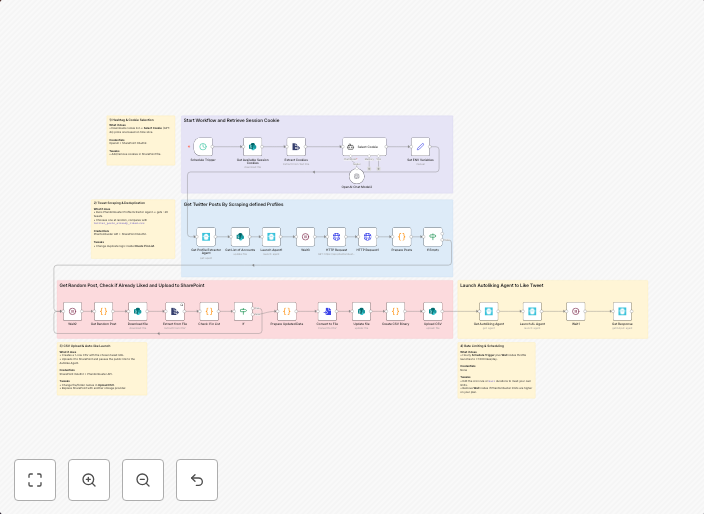
Auto-like tweets from selected profiles with Phantombuster & SharePoint AI rotation
Who’s it for Growth hackers, community builders, and marketers who want to keep their Twitter (X) accounts active by liking posts from selected profiles...
Get This WorkflowAbout This Workflow
What This Workflow Does
This workflow automates the process of liking tweets from selected profiles on Twitter (X), helping users to maintain an active presence and engagement. By integrating Phantombuster and SharePoint AI rotation, the workflow streamlines the process of selecting and liking tweets. This automation can help increase activity and engagement on Twitter (X) accounts.
Who Should Use This
This workflow is ideal for growth hackers, community builders, and marketers who want to maintain an active Twitter (X) presence and engage with their audience. It's perfect for those who want to save time while still showing interest in their followers' content.
Key Features
- Automatic tweet liking: The workflow automatically likes tweets from selected profiles, saving time and effort.
- Phantombuster integration: Phantombuster is used to select and filter tweets based on specific criteria.
- SharePoint AI rotation: The workflow uses SharePoint AI rotation to rotate through selected profiles and maintain a varied engagement strategy.
- Customizable: Users can customize the workflow to fit their specific social media marketing needs.
How to Get Started
To use this workflow, simply import it into your n8n account and customize the settings to select the profiles you want to like tweets from. Make sure to set up your Phantombuster and SharePoint AI rotation integrations according to the provided instructions.
Use This Workflow in n8n →Similar Workflows




Affiliate Disclosure: We may earn a commission if you sign up for n8n through our links. This doesn't affect our recommendations.