Auto workflow backup to Google Drive – automated export of all your workflows
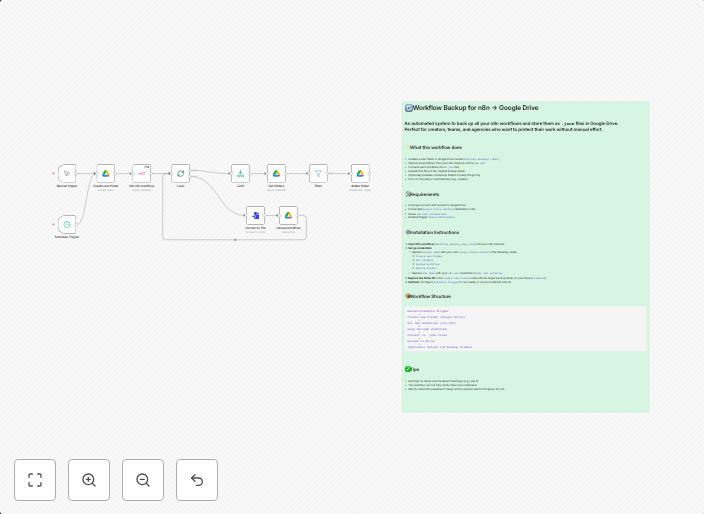
n8n Workflow Backup to Google Drive – Automated Export of All Your Workflows This workflow is designed to automatically create backups of all your workflows...
Get This WorkflowAbout This Workflow
What This Workflow Does
This workflow is designed to automatically create backups of all your workflows in n8n, ensuring that your automation projects are safely stored and easily recoverable in case of data loss or system failures. The backup process is automated, so you won't need to worry about manually exporting and saving your workflows. By using this workflow, you can maintain a secure and up-to-date backup of all your workflows.
Who Should Use This
This workflow is ideal for developers, DevOps teams, and business owners who rely on n8n for automating tasks and workflows. If you want to ensure that your automation projects are protected and easily recoverable, this workflow is a must-have.
Key Features
- Automated Workflow Backup: The workflow automatically exports all your workflows to Google Drive, ensuring that you have a secure and up-to-date backup.
- Scheduled Backup: The workflow is designed to run on a scheduled basis, allowing you to set the frequency of backups to suit your needs.
- Google Drive Integration: The workflow seamlessly integrates with Google Drive, making it easy to store and manage your backup files.
- Customizable: The workflow can be easily customized to suit your specific needs, including changing the backup frequency and storage location.
How to Get Started
To get started with this workflow, simply import it into your n8n workspace and configure the Google Drive credentials. You can then customize the workflow to suit your specific needs, including changing the backup frequency and storage location.
Use This Workflow in n8n →Similar Workflows



Affiliate Disclosure: We may earn a commission if you sign up for n8n through our links. This doesn't affect our recommendations.