Automate Everhour time-off sync to Google Calendar with all-day events
Who’s it forTeams that track absences in Everhour and want a shared Google Calendar view for quick planning. Ideal for managers, HR/OPS, and teammates who...
Get This WorkflowAbout This Workflow
What This Workflow Does
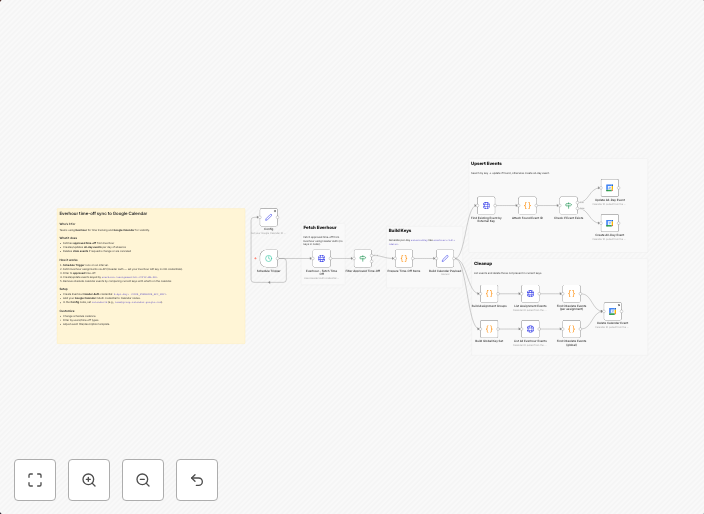
This n8n automation workflow synchronizes time-off data from Everhour with all-day events in Google Calendar, ensuring a shared and up-to-date view for quick planning and team coordination. The workflow automates the process of updating Google Calendar with team members' time-off absences, making it easier for managers, HR/OPS, and teammates to plan and prepare for staffing needs. This automation helps teams save time and reduce administrative burden.
Who Should Use This
This workflow is ideal for teams that use Everhour to track absences and want to have a centralized view of team members' time-off in Google Calendar. It's particularly beneficial for managers, HR/OPS, and teammates who need to plan and coordinate team schedules, meetings, and projects.
Key Features
- Everhour Integration: The workflow integrates with Everhour to fetch time-off data for team members.
- Google Calendar Sync: The workflow updates Google Calendar with all-day events for team members' time-off absences.
- No Manual Data Entry: The automation eliminates the need for manual data entry, saving time and reducing errors.
- Real-time Updates: The workflow provides real-time updates of team members' time-off absences, ensuring that Google Calendar stays up-to-date.
How to Get Started
To use this workflow, import it into your n8n instance and customize the workflow by connecting your Everhour and Google Calendar accounts. Follow the onboarding process to set up the workflow and start syncing time-off data between Everhour and Google Calendar.
Use This Workflow in n8n →Similar Workflows



Affiliate Disclosure: We may earn a commission if you sign up for n8n through our links. This doesn't affect our recommendations.