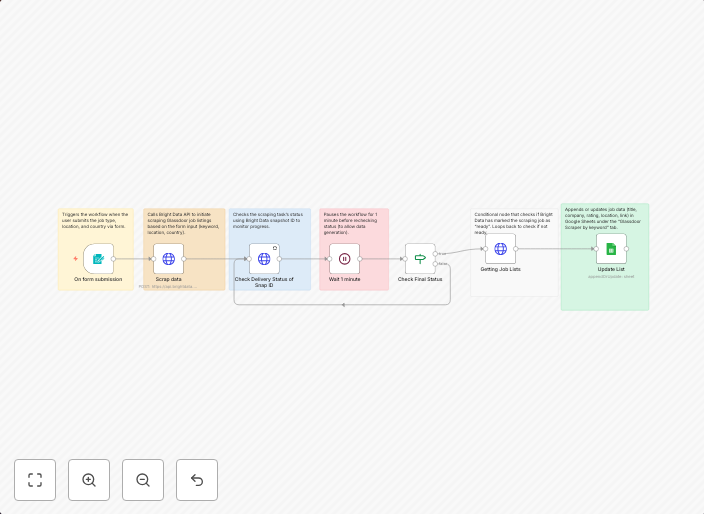
Automate Glassdoor job search with Bright Data scraping & Google Sheets storage
🔍 Glassdoor Job Finder: Bright Data Scraping + Keyword-Based Automation A comprehensive n8n automation that scrapes Glassdoor job listings using Bright...
Get This WorkflowAbout This Workflow
What This Workflow Does
This n8n automation workflow uses Bright Data scraping to collect job listings from Glassdoor based on custom search criteria, and then stores the results in a Google Sheets database. The workflow utilizes keyword-based automation to filter and categorize job listings, making it easier to track and analyze job market data. The comprehensive workflow enables users to monitor and adapt to changing job market trends.
Who Should Use This
This workflow is ideal for market researchers, recruiters, and business owners who need to stay up-to-date on job market trends and analyze data to inform their hiring strategies. The workflow's automation capabilities make it a valuable tool for anyone who wants to save time and effort when monitoring job listings.
Key Features
- Glassdoor Scraping: Utilizes Bright Data to collect job listings from Glassdoor based on custom search criteria.
- Keyword-Based Automation: Filters and categorizes job listings based on specific keywords and criteria.
- Google Sheets Storage: Stores collected job listings in a Google Sheets database for easy analysis and tracking.
- Customizable Search Criteria: Allows users to set custom search criteria to target specific job markets and industries.
How to Get Started
To use this workflow, import the automation into your n8n instance and customize the search criteria to match your specific job market research needs. The workflow is designed to be easy to set up and use, even for those without extensive automation experience.
Use This Workflow in n8n →Similar Workflows




Affiliate Disclosure: We may earn a commission if you sign up for n8n through our links. This doesn't affect our recommendations.