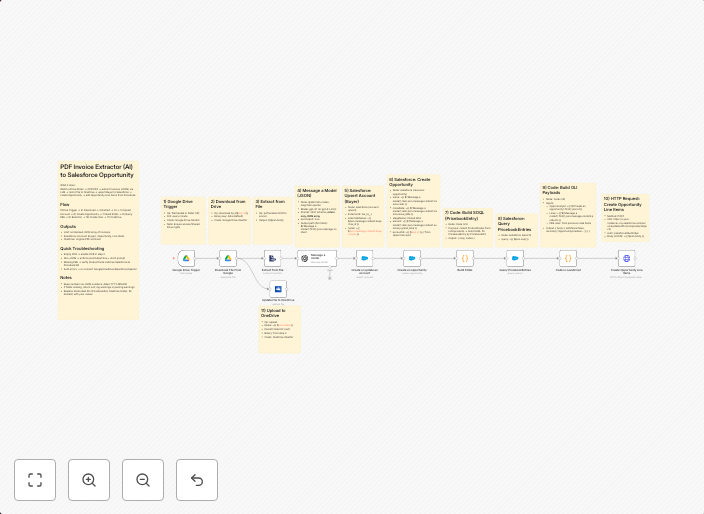
Automate invoice processing with OCR, GPT-4 & Salesforce opportunity creation
PDF Invoice Extractor (AI) End-to-end pipeline: Watch Drive ➜ Download PDF ➜ OCR text ➜ AI normalize to JSON ➜ Upsert Buyer (Account) ➜ Create Opportunity ➜...
Get This WorkflowAbout This Workflow
What This Workflow Does
This n8n automation workflow automates the process of extracting and processing invoices from PDF files using AI-powered Optical Character Recognition (OCR). The workflow then normalizes the extracted data into a JSON format and uses this information to create new opportunities in Salesforce, linking them to existing buyer accounts. This end-to-end pipeline streamlines invoice processing and enables data-driven business decisions.
Who Should Use This
This workflow is ideal for businesses that frequently receive invoices in PDF format and require automated processing to keep their sales and accounting systems up-to-date. It's particularly useful for companies with complex sales pipelines or those looking to automate routine data entry tasks.
Key Features
- AI-powered OCR: Extracts text from PDF invoices using advanced machine learning algorithms.
- Data normalization: Converts extracted text into a standardized JSON format for seamless integration with Salesforce.
- Upsert Buyer (Account): Updates or creates buyer accounts in Salesforce based on extracted data.
- Create Opportunity: Generates new opportunities in Salesforce linked to the relevant buyer accounts.
How to Get Started
To get started with this workflow, import it into your n8n instance and configure the necessary connections to your Google Drive account, OCR service, and Salesforce organization. Customize the workflow as needed to fit your specific business requirements and data formats.
Use This Workflow in n8n →Similar Workflows




Affiliate Disclosure: We may earn a commission if you sign up for n8n through our links. This doesn't affect our recommendations.