Automate invoice processing with OCR.Space, GPT-4 & Google Drive to Gmail
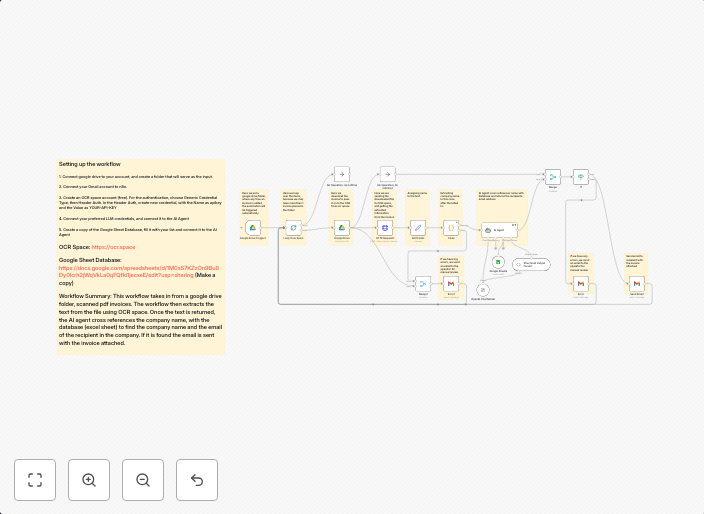
How it worksWatches a Google Drive folder for new (scanned) invoices. Each new file automatically triggers the workflow.Downloads and processes each invoice...
Get This WorkflowAbout This Workflow
What This Workflow Does
This workflow automates the processing of scanned invoices stored in a Google Drive folder, using Optical Character Recognition (OCR) powered by OCR.Space, AI-driven summarization by GPT-4, and final delivery to Gmail. It streamlines the invoice processing workflow by leveraging AI and automation. The workflow ensures timely and accurate processing of invoices.
Who Should Use This
This workflow is suitable for businesses, organizations, and individuals who receive scanned invoices and need to process them efficiently. It can be particularly useful for finance teams, accounting departments, and administrators.
Key Features
- Automated Invoice Detection: Triggers whenever a new file is added to the designated Google Drive folder.
- OCR-based Invoice Extraction: Uses OCR.Space to extract text from scanned invoices.
- AI-powered Summarization: Utilizes GPT-4 to summarize and analyze the invoice content.
- Automated Gmail Delivery: Sends the processed invoice to Gmail, ensuring timely receipt and management.
How to Get Started
To use this workflow, simply import it into your n8n dashboard and customize the Google Drive folder path and Gmail account settings to match your specific requirements. This workflow is ready-to-use and requires minimal configuration to get started with automating your invoice processing.
Use This Workflow in n8n →Similar Workflows




Affiliate Disclosure: We may earn a commission if you sign up for n8n through our links. This doesn't affect our recommendations.