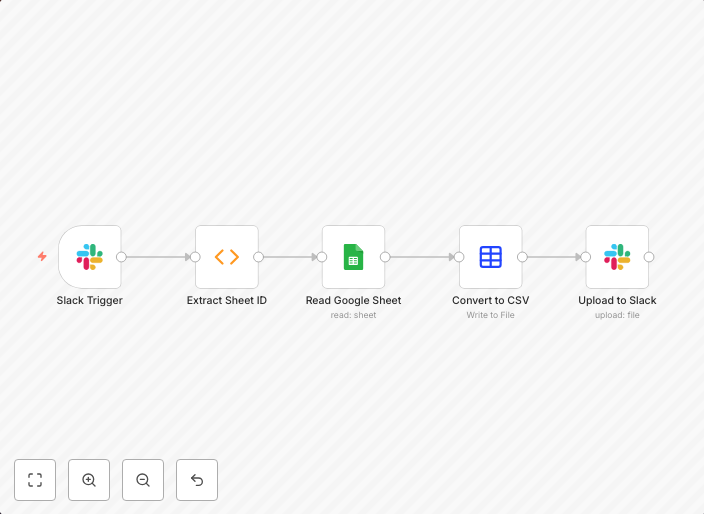
Automated Google Sheet to CSV conversion via Slack messages
Step 1: Slack Trigger The workflow starts whenever your Slack bot is mentioned or receives an event in a channel. The message that triggered it (including...
Get This WorkflowAbout This Workflow
Automated Google Sheet to CSV conversion via Slack messages
This workflow automates the process of converting Google Sheets to CSV files triggered by specific Slack messages. It listens for mentions or events in a Slack channel and uses this information to perform the conversion. The resulting CSV file is then available for further processing or download.
This workflow is ideal for marketers, business owners, and developers who frequently need to export data from Google Sheets to CSV files for analysis, reporting, or integration with other tools. It streamlines the process, saving time and effort.
- Slack Trigger: The workflow starts with a Slack trigger that responds to mentions or events in a specified channel.
- Google Sheets Integration: The workflow connects to a Google Sheets document to retrieve the data.
- CSV Conversion: The workflow converts the data from Google Sheets to a CSV file.
- Downloadable CSV: The resulting CSV file is available for download or further processing.
To get started, import the workflow into n8n and customize the Slack trigger to match your channel and notification settings. Configure the Google Sheets integration to connect to your desired document and adjust the workflow as needed to fit your specific use case.
Use This Workflow in n8n →Similar Workflows




Affiliate Disclosure: We may earn a commission if you sign up for n8n through our links. This doesn't affect our recommendations.