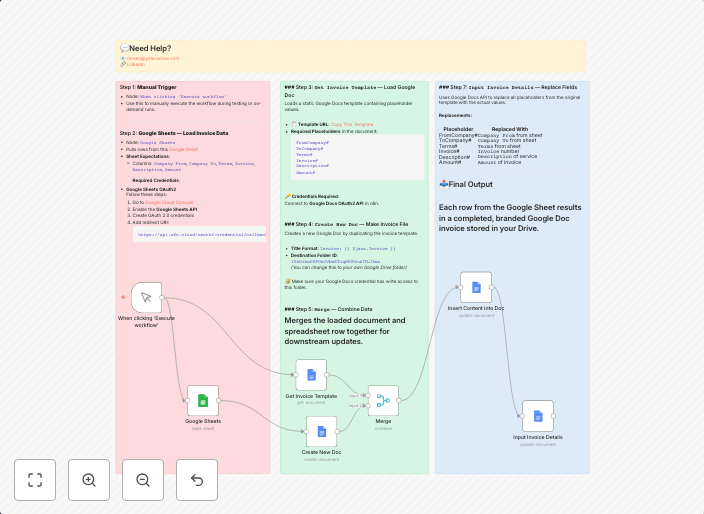
Automated invoice generator from Google Sheets to Google Docs
This workflow automates invoice creation using Google Sheets for structured input and Google Docs for templated output — all built inside n8n. 🛠️...
Get This WorkflowAbout This Workflow
What This Workflow Does
This workflow automates the creation of invoices by extracting structured data from a Google Sheet and generating a templated invoice in Google Docs using n8n. It streamlines the invoicing process, saving time and reducing errors. With this workflow, users can quickly create professional-looking invoices.
Who Should Use This
This workflow is ideal for business owners, accountants, and administrative staff who regularly need to generate invoices and want to simplify the process. It is particularly useful for those who already use Google Sheets and Google Docs.
Key Features
- Automated Data Extraction: Extracts structured data from a Google Sheet and uses it to populate the invoice template in Google Docs.
- Templated Invoices: Generates professional-looking invoices in Google Docs using a pre-designed template.
- Time-Saving: Reduces the manual effort required to create invoices, saving time for more important tasks.
- Error-Reduced: Minimizes errors by automatically populating the invoice with accurate data from the Google Sheet.
How to Get Started
To use this workflow, simply import it into your n8n account and customize the Google Sheet and Google Docs integrations to match your specific needs. You can then configure the workflow to automate the invoicing process for your business.
Use This Workflow in n8n →Similar Workflows




Affiliate Disclosure: We may earn a commission if you sign up for n8n through our links. This doesn't affect our recommendations.