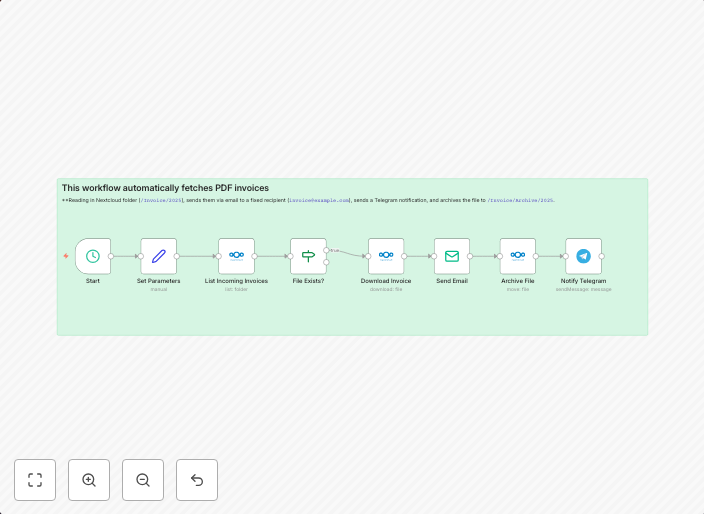
Automated invoice management with Nextcloud, email and Telegram notifications
This workflow automatically fetches PDF invoices from a Nextcloud folder (/Invoice/Incoming), sends them via email to a fixed recipient...
Get This WorkflowAbout This Workflow
What This Workflow Does
This workflow automates the process of managing invoices by fetching PDF files from a specified Nextcloud folder, sending them via email to a fixed recipient, and also notifying the user through Telegram. It streamlines the invoice processing workflow, reducing manual effort and increasing efficiency. The workflow ensures timely notification and easy access to invoices.
Who Should Use This
This workflow is ideal for business owners, accountants, and administrators responsible for managing financial documents and notifications. It is particularly useful for those who want to automate their invoice processing and notification systems.
Key Features
- Fetches PDF invoices from a specified Nextcloud folder (/Invoice/Incoming)
- Sends invoices via email to a fixed recipient
- Notifies the user through Telegram
- Automates the entire process, reducing manual effort and increasing efficiency
How to Get Started
To use this workflow, import it into your n8n instance and adjust the settings to match your specific Nextcloud folder path and notification preferences. Customize the email recipient and Telegram notification settings to fit your needs.
Use This Workflow in n8n →Similar Workflows




Affiliate Disclosure: We may earn a commission if you sign up for n8n through our links. This doesn't affect our recommendations.