Automated n8n workflow backup to GitHub with deletion tracking
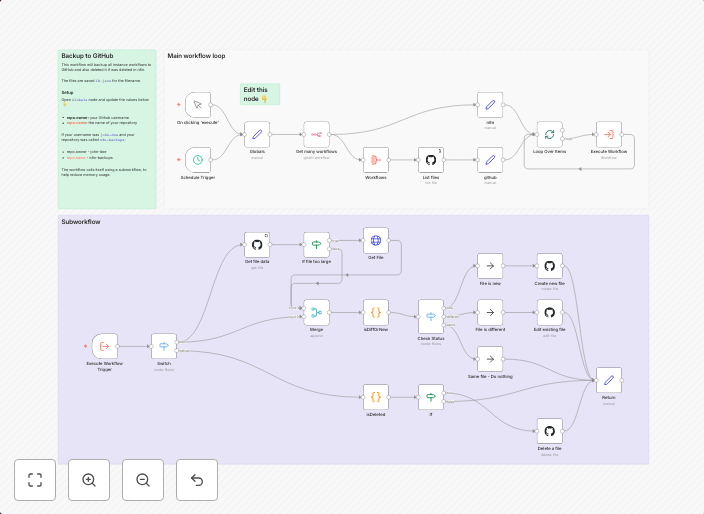
Remixed Backup your workflows to GitHub from Solomon's work. Check out his templates. How it worksThis workflow will backup your workflows to GitHub. It...
Get This WorkflowAbout This Workflow
What This Workflow Does
This n8n workflow automates the process of backing up your workflows to a GitHub repository, ensuring your workflow configurations are safely stored and version-controlled. The workflow also tracks deletions, allowing you to easily monitor changes to your workflows. This automation helps maintain a secure and up-to-date backup of your n8n workflows.
Who Should Use This
This workflow is ideal for developers and DevOps teams who use n8n for automation and workflows, as it provides a reliable way to manage and store their workflow configurations.
Key Features
- Backup to GitHub: The workflow securely stores your n8n workflows in a GitHub repository, allowing for version control and easy recovery in case of data loss.
- Deletion Tracking: The workflow tracks changes to your workflows, enabling you to monitor deletions and ensure your workflow configurations remain up-to-date.
- Scheduled Backup: The workflow can be set to run at regular intervals, ensuring your backups are always up-to-date and synchronized with your GitHub repository.
- Automation: The workflow automates the backup process, saving time and reducing the risk of manual errors.
How to Get Started
To use this workflow, import it into your n8n environment, then configure the GitHub credentials and repository settings to match your requirements. You can then customize the workflow to suit your needs and schedule it to run at desired intervals.
Use This Workflow in n8n →Similar Workflows

Affiliate Disclosure: We may earn a commission if you sign up for n8n through our links. This doesn't affect our recommendations.